Translate your resume to another language with AI
Build and translate resumes across 6 languages — English, Français, Deutsch, Nederlands, Español, Português — with AI that keeps your name, companies, technical terms, and dates intact.
- Build full resumes in 6 languages with a master profile per language
- Names, companies, and technical terms stay verbatim
- Free instant translator handles 13+ languages for quick one-off translations
Translate to
1 clickNames, companies & dates kept intact
To translate your resume, open it in the AI ResumeGuru editor and pick a target language: the AI translates every field and forks a separate copy, so your layout, names, employers, and dates survive and the original is never overwritten. The editor covers 6 languages; a free text translator handles quick one-off translations.
Try the free resume translator right here
Paste any resume text, pick a language, and the free translator returns it translated — no account, no credits. It gives you plain text back, which is the taste; the editor is where a whole resume gets translated with its layout intact.
Languages the editor builds resumes in
The text translator above is free and needs no account. Translating a whole resume in the editor needs a free account for the workspace, and Pro for the translation step itself — the translated copy is then fully editable, and the original is never overwritten.
How does the AI resume translator work?
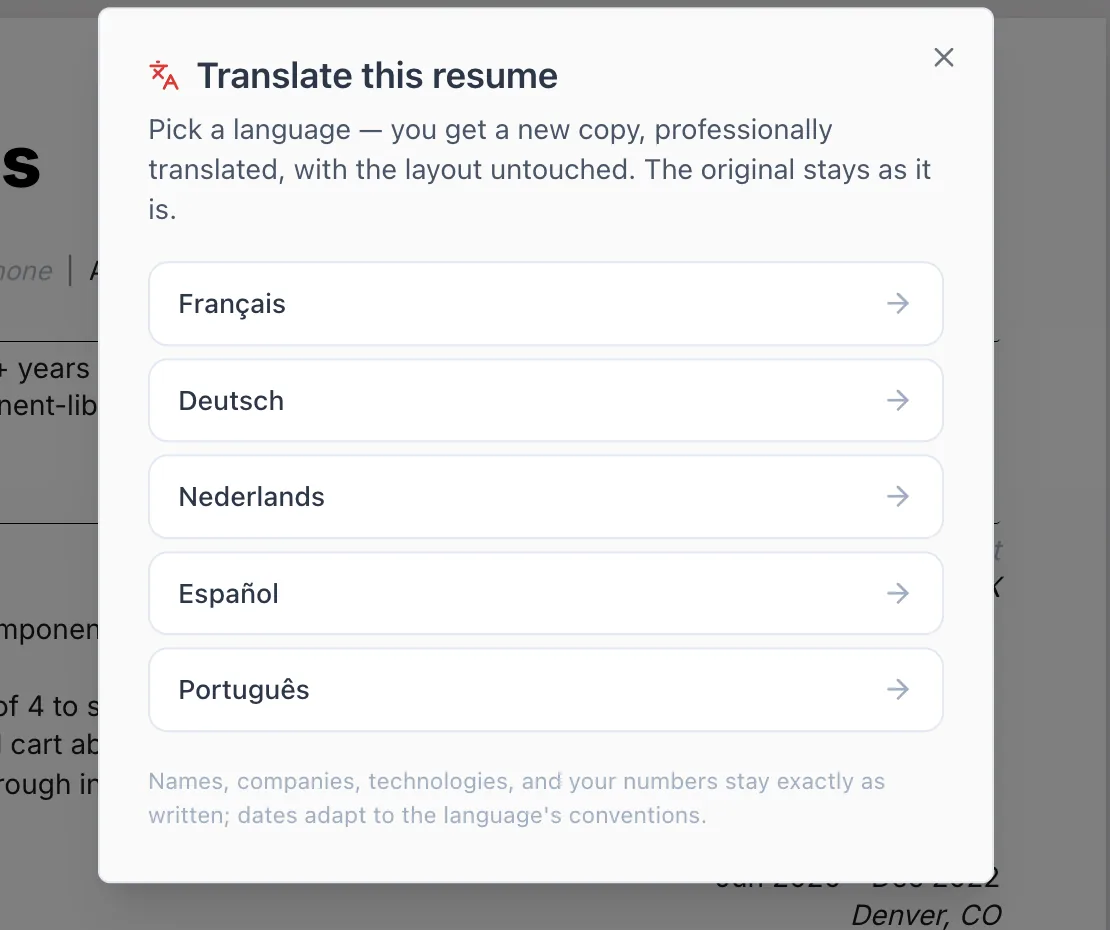
Pick a target language and the translator converts your resume into a new copy, leaving proper nouns and structure untouched.
- Step 01
Choose a target language
Open your resume and pick one of 6 target languages. Your source resume stays exactly as it is — translation always creates a separate copy.
- Step 02
AI translates the content
The translator sends only translatable text to the AI. Your name, company names, contact details, photos, and layout never leave the document, so they can't drift. Section titles re-localize automatically.
- Step 03
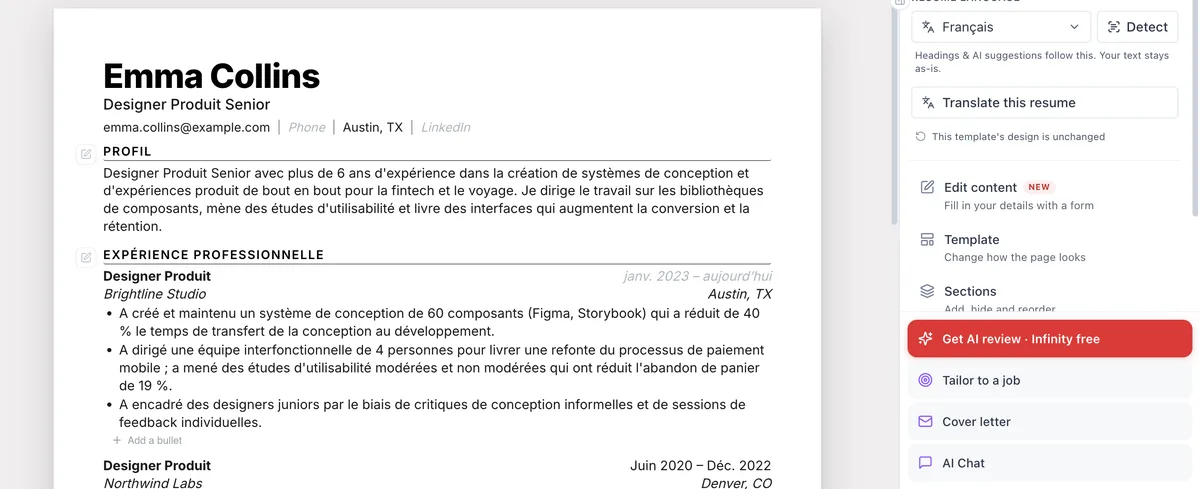
Get a translated copy
You receive a fully translated resume as a new document you can edit, download, or save as a per-language master profile — without touching the original.
Why it works
Proper nouns stay put
Your name, employer names, and contact details are never sent to the model, so they're preserved verbatim. A brand doesn't get translated by accident.
Technical terms and dates preserved
Translation is guided to keep technical terminology and date formats intact, so a JavaScript role stays JavaScript and your timeline stays readable.
A master profile per language
Keep a separate master resume for each of the 6 languages, so applying in a new market means tailoring from a profile that's already in that language.
Non-destructive by design
Translation always forks a new copy. Your source resume is never overwritten, so you can keep every language side by side.
AI resume translation vs. generic translation tools
| Comparison criteria | AI ResumeGuru | Generic translator |
|---|---|---|
| Keeps names & companies verbatim | Yes — never sent to the model | Often translated by mistake |
| Preserves resume structure | Yes | Formatting frequently breaks |
| Localizes section titles | Automatically | Manual cleanup |
| Per-language master profiles | Built in | Not available |
| Editable, downloadable resume | Yes | Plain text output |
Translate to a specific language
Prefer a quick, free translation? Use the instant translator for a single language:
Is the resume translation free?
Partly, and it is worth being precise about which part. The text translator is genuinely free and needs no account: paste resume text, pick a language, get translated text back. Translating a whole resume inside the editor is different — it needs a free account to reach the workspace, and the translation step itself is a Pro feature, because it translates every field individually and rebuilds a complete, editable, formatted document rather than returning a block of text. Everything around it stays free: building resumes, keeping a master profile in each of the six editor languages, and editing a translated copy once you have one.
Should you translate your resume, or apply in English?
It depends on the market. Many multinationals accept English, while local employers often expect the local language — when you're unsure, keep both. Because translation here always forks a new copy, you can maintain an English master and a localized version side by side and choose per application. Match the terminology to the target country's job postings so ATS scans still hit the right keywords in the right language.
What's the difference between translating and localizing a resume?
A generic translator swaps words — and mistranslates job titles, degrees, and brand names in the process. Localizing adapts to the target market: section titles re-localize, professional terminology matches how local recruiters phrase things, and proper nouns stay verbatim because your name, employers, and contact details are never sent to the model. That's the difference between a readable draft and one that reads as machine output.
The text resume translator is free with no account. Building resumes and keeping a master profile per language is free with an account; the one-click AI translation of a whole resume is a Pro feature.
Frequently asked questions
Is there a free resume translator?
Yes. The text resume translator is free and needs no signup — paste your resume text, pick a language, get it back translated. Translating a whole formatted resume in the editor needs a free account for the workspace and Pro for the translation step itself.
How many languages are supported?
Two products, two counts. In the editor you build full multilingual resumes with per-language master profiles across 6 languages: English, Français, Deutsch, Nederlands, Español, Português. The free instant translator handles 13+ languages — including Spanish, German, French, Italian, Japanese, and Arabic — for quick one-off translations.
Will it translate my name and company names?
No — and that's intentional. Your name, employer names, and contact details are never sent to the AI, so they stay exactly as written. Only the translatable content, like summaries and bullet points, is translated.
Does translating overwrite my original resume?
No. Every translation creates a new, separate copy. Your source resume is left untouched, so you can keep versions in several languages at once.
Are technical terms and dates preserved?
Yes. The translator is guided to keep technical terminology and date formats intact, so skills and your timeline read correctly in the new language.
What is a per-language master profile?
It's a master resume kept in a specific language. When you apply in that market, you tailor from a profile that's already written in the right language instead of translating from scratch each time.
Can I edit the translated resume afterward?
Yes. The translation lands as a new, fully editable copy — you can refine any line, adjust wording for the local market, download it, or save it as a per-language master. Your source resume stays untouched throughout.
Are the translations professional enough for business?
The translation is tuned for a professional resume tone and recruiter-facing terminology rather than a literal word-for-word swap, so it reads like a resume a hiring manager in that market would expect — not a machine translation.
Do I need a native speaker to check my translated resume?
Honestly, it's a strong draft, not a substitute for a native eye. The AI handles terminology and structure well, but a native speaker can still catch tone and cultural nuance — worth a quick review for a role you really want.