Turn your resume into a website — free
Paste your resume or drop the PDF and watch a real personal website build itself below, right now, with no account. When you like what you see, publish it at your own link.
- Publish free at airesume.guru/u/your-name
- 14 designed templates, each with light and dark mode
- Share one link on your CV, LinkedIn, and email signature
Paste your resume into the builder below and it becomes a real personal website on the spot — no account, no coding, nothing to install. AI ResumeGuru is a resume website builder: it maps your experience, skills, and education into a site, you pick a design, and you publish it at airesume.guru/u/your-name. Publishing is free with an account; a custom slug and your own domain are Pro.
Build your website from your resume
Drop a PDF or DOCX, paste the text, or use our sample. Your resume is mapped on your device and rendered as a real site below — no account, no credits.
Drop your resume here or click to browse
PDF or DOCX, up to 4MB
0 / 40000 characters
Pasted text stays in your browser. A dropped file is read for its text and nothing is stored.
How do you turn a resume into a website?
Three steps from a document to a live personal site with its own shareable link.
- Step 01
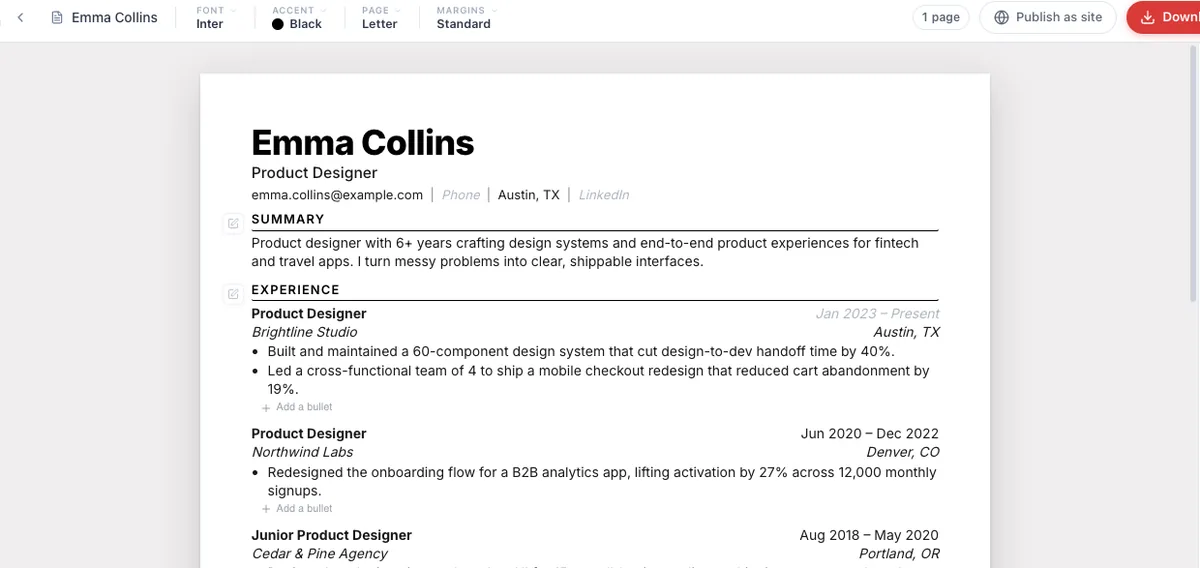
Open or import your resume
Start from a resume already in the editor, or paste and import an existing one. Your experience, skills, and education carry over automatically — nothing is retyped.
- Step 02
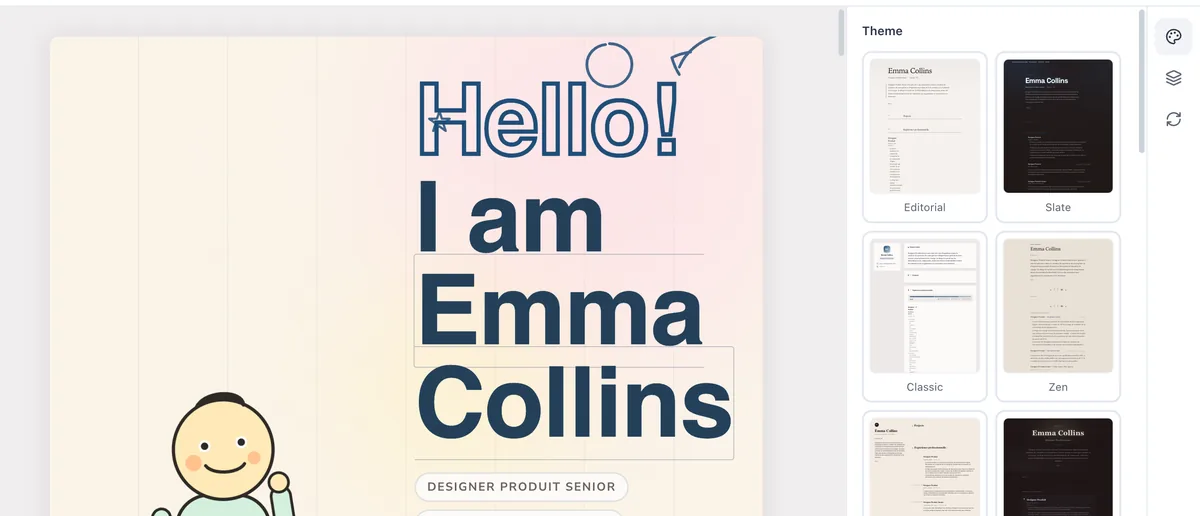
Pick a template
Choose from 14 templates spanning classic and creative styles. Each supports a visitor light/dark toggle and several color schemes, so one resume can look completely different depending on the look you want.
- Step 03
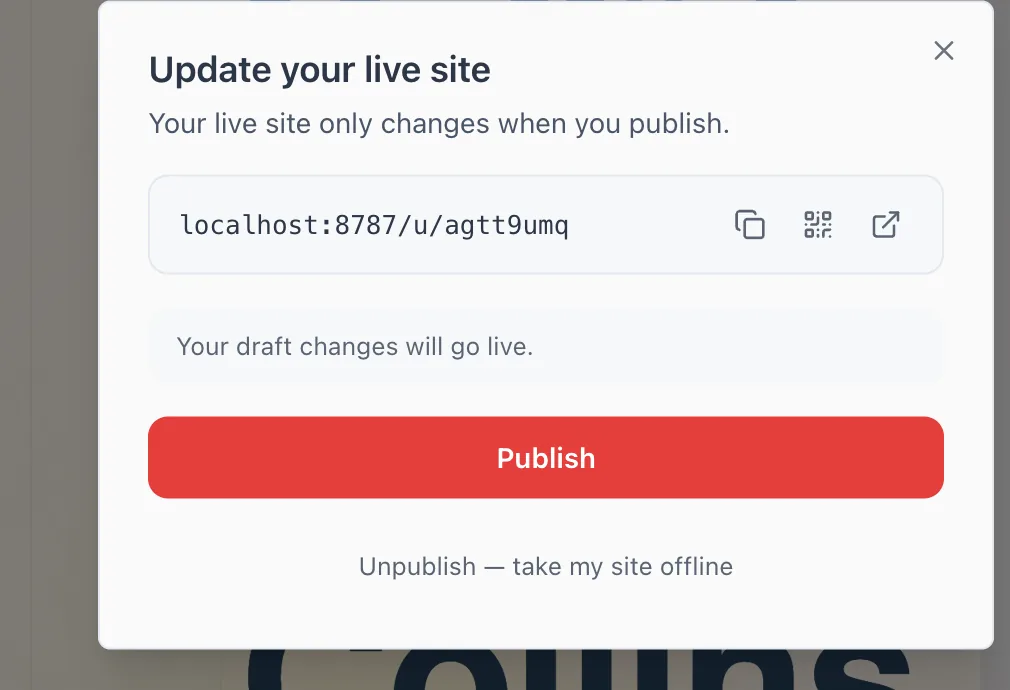
Publish and share
Click Publish to go live at airesume.guru/u/your-name. Copy the link onto your CV, LinkedIn, or email signature. You can unpublish at any time and republish later without losing your slug.
Why it works
No coding, ever
Your website is generated from your resume content. There is no HTML, CSS, template language, or hosting setup to learn — you edit words, not code.
Mobile-friendly by default
Every template is responsive and readable on phones, tablets, and desktops out of the box, so the link works wherever a recruiter opens it.
You control what's live
Publishing is a deliberate action, and unpublishing takes it offline instantly. Your website only shows what you choose to publish.
One source, many looks
Templates ship with visitor light/dark modes and multiple color schemes, so 14 designs become far more distinct looks from the same content.
See the templates with real content in them
Complete example sites you can click through, one per template — not screenshots. Each uses a fictional persona, so you can judge the design rather than the person.

Nadia Brennan
Science journalist & long-form editor·Edinburgh, Scotland
I write about the messy middle of science — the years between a promising result and a thing that actually works. Ten years on staff at national desks, now independent, mostly covering climate adaptation and public health. My favourite stories are the ones where the data and the people disagree, and you have to sit with both.
Experience
2021 — Present
Independent journalist
Bylines in The Atlantic, Wired, Nature- Report and write long-form features on climate adaptation, usually 4,000–8,000 words.
- Two pieces cited in UK parliamentary committee evidence on flood planning.
- Work commissioned across print, audio and one very reluctant video appearance.
2017 — 2021
Senior science correspondent
The Northern Review- Led the paper's pandemic coverage across 2020, coordinating a desk of six reporters.
- Built the outlet's first data-led explainer format, which became its most-read recurring feature.
- Mentored three junior reporters, two of whom now run their own desks.
2014 — 2017
Staff writer
Meridian MagazineGeneral science beat — wrote roughly forty features a year and learned to file clean copy fast.
Selected work
A three-part series on managed retreat
The Water Will Come Back
Eighteen months following four coastal villages as they negotiated whether to move inland. Won the Ashworth Prize for environmental reporting and is now taught on two journalism MAs.
- Long-form
- Climate
- Award-winning
Podcast, 12 episodes
Trial and Error
A limited series on clinical trials that failed and what the field learned anyway. Co-produced with Held Audio; roughly 400,000 downloads across the run.
- Audio
- Health
Education
2013 — 2014
University of Edinburgh
MSc Science CommunicationDissertation on uncertainty language in climate reporting.
2010 — 2013
University of Leeds
BA English LiteratureWhat I do
- Reporting
- Long-form features, investigations, FOI requests, data journalism
- Editing
- Commissioning, structural edits, mentoring junior reporters
- Also
- Audio production, live panel moderation, teaching
References
Nadia files the piece you commissioned and then quietly hands you a better one. She is the rare reporter who will tell you when her own premise has collapsed.
She can hold a complicated scientific argument and a human story in the same paragraph without flattening either. That is much harder than she makes it look.
Awards & talks
2024
Ashworth Prize for Environmental Reporting
Winner, long-form categoryFor 'The Water Will Come Back'.
2023
Reporting Uncertainty
Keynote, European Science Journalism ForumOn why 'scientists say' is usually a failure of nerve.
Marcus Oyelaran
Twelve years making physical things arrive where they are supposed to, on the day they are supposed to. I work on the unglamorous half of operations: warehouse throughput, carrier contracts, and the forecasting that stops a peak season from becoming an incident review.
Experience
- Run a 140-person operation across two distribution centres and a partner carrier network.
- Cut average order-to-door time from 4.1 to 2.6 days without adding headcount.
- Renegotiated the carrier book in 2023, saving roughly €1.8M annually at equivalent service levels.
- Introduced a weekly forecast review that took peak-season stockouts from routine to rare.
- Owned fulfilment for the Benelux region across 60 stores plus e-commerce.
- Led the warehouse management system migration — 11 weeks, no missed shipping day.
- Built the returns process that later became the group standard.
- Demand planning and supplier scorecards for a perishable-goods portfolio.
- Where I learned that a forecast nobody trusts is worse than no forecast.
2021 — Present
Head of Operations
Havenlijn DistributionRotterdam
2018 — 2021
Regional Operations Manager
Nordkant Retail GroupAntwerp
2014 — 2018
Supply Chain Analyst
Meridian FoodsUtrecht
Key initiatives
Warehouse management system migration
Nordkant Retail Group · 2020Replaced a 14-year-old WMS across two sites in 11 weeks, running old and new in parallel for three of them. Zero missed shipping days. The rollback plan was never used, which is the point.
- Systems
- Change management
Carrier network redesign
Havenlijn · 2023Rebuilt the carrier mix around service-level bands instead of flat lowest-cost. Annual spend down about €1.8M with on-time delivery up 4 points.
- Procurement
- Cost
Education
Erasmus University Rotterdam
MSc Supply Chain Management2012 — 2014
Hogeschool Utrecht
BSc Logistics Engineering2008 — 2012
Skills
Operations
Network design, capacity planning, S&OP, carrier management, lean/continuous improvement
Systems
SAP EWM, Manhattan WMS, Power BI, SQL
Languages
English (native), Dutch (fluent), French (working)
What colleagues say
Marcus brought us a carrier proposal with the downside case on the first slide. That is not how these conversations normally go, and it is why the board approved it in one meeting.
He ran the WMS migration as calmly as anyone I have worked with. Eleven weeks, two sites, and the floor team never once felt like it was being done to them.
Certifications
CSCP — Certified Supply Chain Professional
2019Lean Six Sigma, Black Belt
2017Hana Sugimoto
Kyoto, Japan
Listening for the awkward pause. I am a researcher, which mostly means I sit with people while they use something and try not to rescue them. Eleven years of it, across banking, public services and one long stretch in agriculture software. The work I am proudest of usually looks like a decision that did not get made — a feature quietly dropped, a redesign postponed a quarter until we understood why people were doing the strange thing. I write everything up, because a finding nobody can find again is not a finding. I run studies in Japanese and English and have made peace with being slower in the second one.
Work
- Lead research for a platform used by about 30,000 smallholder farms across Japan and Korea.
- Spent the first six months in the field rather than in the product, which is why the second six months went well.
- Built a repository of 340 tagged sessions that designers actually search before starting work — the adoption problem was social, not technical.
- Mentor two researchers and run the practice's study-design review.
- Research on residency and tax services used by people who had no alternative to using them.
- Ran accessibility studies with participants who were routinely designed for and rarely consulted.
- Wrote the service standard's research chapter, which is now the thing I get emailed about most.
- Usability and concept testing across retail banking apps and branch tooling.
- Learned to present a finding to people who had already decided, and to know when that was worth doing.
Transcription, recruitment and eventually moderation. Three thousand hours of watching other people run studies badly and well.
Studies
Forty-one farm visits across six prefectures, watching people use a product designed for a desk while standing in mud with one glove off. The report ended one roadmap and started a better one. It is the only research I have done that changed the hardware requirements.
sugimoto.example/fields- Field research
- Agriculture
- Ethnography
A year following people through a form most of them filled in wrong at least once. We found that the failure was almost never comprehension — it was that the form asked for a document nobody carries. Completion went from 54% to 88% after we stopped asking.
- Public services
- Accessibility
Our first two research repositories failed because they were archives. The third worked because it was organised around the questions designers ask on a Monday morning rather than around the studies we had run.
- ResearchOps
- Knowledge management
A long piece on moderating people who are being polite to you. Mostly about silence, and about the three seconds after you think the answer has finished. Widely shared, occasionally argued with.
sugimoto.example/quiet- Method
- Writing
A three-month diary study with branch staff, which produced far less drama and far more usable detail than the interviews it replaced. I now propose diary studies more often than anyone wants me to.
- Diary study
- Banking
Craft
- Methods
- Contextual inquiry, diary studies, usability testing, concept testing, survey design
- Analysis
- Thematic analysis, journey mapping, service blueprinting
- Practice
- ResearchOps, participant recruitment, ethics review, mentoring
- Languages
- Japanese (native), English (fluent), Korean (conversational)
Praise
Hana came back from the field and told us, gently, that we had built the wrong thing. She had the evidence arranged so that nobody had to lose an argument to agree with her.
She is the only researcher I have worked with who writes up the studies that found nothing. Those write-ups have saved us more money than the exciting ones.
Study
MA Cognitive Psychology, Kyoto University · 2011 — 2013
Thesis on question-order effects in structured interviews.
BA Sociology, Doshisha University · 2007 — 2011
Aside
One term a year, twenty students, and a standing rule that nobody may say the word persona.
Fourteen essays on field research and the discomfort that makes it work. Second printing.

Rosa Adeyemo
Product manager — clinical software
I build software that clinicians have to use whether they like it or not, which sets a fairly high bar for not wasting their time. Eight years across hospital systems and remote monitoring. My rule is that nothing ships until I have watched someone use it during an actual shift.
Toronto, Canada
Experience
Lead Product Manager
2022 — Present- Own the inpatient documentation product used across eleven hospitals and about 9,000 clinicians.
- Cut median note-completion time from 6.4 to 3.8 minutes by removing fields rather than adding shortcuts.
- Ran the FHIR migration that finally let us stop maintaining four bespoke integrations.
- Sit on the clinical safety board, which means I have signed my name to things that matter.
Product Manager
2019 — 2022- Ran the remote cardiac monitoring product from 300 to 14,000 enrolled patients.
- Redesigned the alert model after we found nurses were dismissing 92% of notifications unread — the fix was fewer alerts, not better ones.
- Built the escalation pathway with the clinical team instead of for them, which took three months longer and worked.
Associate Product Manager
2017 — 2019- Lab ordering and results delivery for a regional network.
- Learned regulatory documentation the slow way, and that a workflow diagram nobody in the lab recognises is fiction.
Clinical Systems Analyst
2015 — 2017- Supported the EHR rollout across three wards, mostly at 3am during cutover weekends.
- The best product education I have had, and I would not repeat it.
Projects
Note redesign
Northline Health · 2023Removed 41 fields from the inpatient note after auditing what was actually read downstream. Median completion time fell by 40% with no loss in chart completeness.
- Clinical workflow
- Research
- EHR
FHIR migration
Northline Health · 2024Moved eleven hospital integrations from bespoke HL7v2 feeds to a shared FHIR layer over fourteen months, one site at a time, with both paths live throughout.
- Interoperability
- FHIR
- Migration
Alert model rebuild
Cadence Remote Care · 2021Rebuilt cardiac alerting around risk tiers rather than thresholds. Notification volume dropped 71% and the acknowledgement rate went from 8% to 64%.
- Safety
- Data
- Monitoring
Escalation pathway
Cadence Remote Care · 2020A shared on-call model between our triage nurses and partner clinics, designed in the room with both. Adopted by nine clinics and still running unchanged.
- Service design
- Clinical ops
Shift shadowing programme
Northline Health · 2022Every engineer and designer on the team does one overnight ward shift a year. Voluntary in the first year, unanimous by the second. Costs us four days and saves considerably more.
- Team practice
- Research
Consent registry
Meridian Diagnostics · 2018A single source of truth for patient consent across a regional lab network, replacing five spreadsheets and one filing cabinet that nobody had opened since 2011.
- Privacy
- Compliance
Skills
Product
Discovery, roadmapping, prioritisation, pricing, stakeholder management
Healthcare
HL7v2, FHIR, clinical safety cases, HIPAA, PHIPA, care pathway design
Data
SQL, cohort analysis, experiment design, Looker, dbt
Ways of working
Contextual research, service blueprinting, incident review, mentoring
References
Rosa is the first product manager I have worked with who deletes more than she adds. Our clinicians noticed before anyone told them anything had changed.
She came to nights for a week before she proposed anything. Nobody from a software company had ever done that, and it showed in what she came back with.
The alert rebuild was the cleanest spec I have been handed. It said what we were not doing, which is the part everyone else leaves out.
Credentials
Clinical Safety Officer certification
2021CPHIMS
2019Education
University of Toronto
MSc Health Informatics2013 — 2015Thesis on alert fatigue in inpatient monitoring, which turned out to be the whole career.
McMaster University
BSc Nursing2009 — 2013Practised for two years before moving to the software side.
 Portfolio
Ivo Rakić
Offensive security researcher/Zagreb, Croatia
I break things on purpose, mostly firmware and the protocols underneath it. Nine years split between a national response unit and product security work, which means I have written both the advisory and the apology. I am considerably better at finding bugs than at estimating how long finding them will take.
Work
Principal Security ResearcherVetrenjača Labs
2022 — Now- Lead a four-person team auditing embedded targets — building automation, medical telemetry, one extremely stubborn parking meter.
- Found and disclosed 31 CVEs over three years, six of them rated critical.
- Built the firmware emulation harness that took our average time-to-first-crash from nine days to under one.
- Run the disclosure process, which is a fifth research and four fifths patiently emailing vendors who do not want to hear from me.
Product Security EngineerModrina Systems
2019 — 2022- Sat inside the engineering org rather than beside it, reviewing designs before anyone built them.
- Wrote the secure-boot implementation now shipping on roughly 400,000 devices.
- Killed two features by demonstrating what they would eventually cost us, which I still count as my best quarters there.
Incident ResponderNational Cyber Response Unit
2016 — 2019- On the rotation for critical-infrastructure incidents, including two that made the news and several that did not.
- Reverse-engineered malware samples for attribution and wrote the public technical breakdowns.
- Learned that the first four hours of an incident are mostly spent telling people to stop deleting things.
Research
HalyardFirmware emulation harness
Visit ↗Boots unmodified ARM firmware under a stubbed peripheral layer so fuzzers can reach code that normally needs the physical board. Open sourced in 2023 — about 1,900 stars and, more usefully, three vendors now run it in CI.
Boiler room chainBuilding automation · 2024
Eleven related findings in a widely deployed building controller, from an unauthenticated write primitive up to full firmware replacement. Coordinated disclosure ran fourteen months across five vendors and one national CERT.
Secure boot rewriteModrina Systems · 2021
Replaced a homegrown signature check with a properly rollback-protected chain, retrofitted onto hardware that shipped without a key store. The interesting constraint was that none of it could brick a device in the field.
glassttySide project
Visit ↗A small terminal UI for diffing firmware images by structure rather than by bytes. Written almost entirely on trains. Roughly forty people use it and two of them have opinions.
Stack
Refs
Ivo told us our flagship feature was indefensible, then spent two weeks proving it rather than arguing about it. We shipped something narrower and much better.
He writes the clearest advisories I have read. Vendors who start out furious with him usually end up asking him to review the fix.
Talks
Eleven Ways Into A Boiler RoomOffensiveCon, Berlin
2025The building-controller chain end to end, including the fourteen months of email.
Emulating The Board You Do Not HaveREcon, Montréal
2023Halyard's design, and the peripherals we gave up on stubbing.
Study
MSc Computing, security trackUniversity of Zagreb
2014 — 2016Thesis on side-channel leakage in constrained devices.
BSc Computer EngineeringUniversity of Zagreb
2011 — 201401Case studies5
Larkfield Credit Union
Positioning & naming · 2024
Four regional credit unions merged and could not agree on what the combined thing was for. I ran nine weeks of member and staff interviews, found that the only claim all four could honestly make was speed of decision, and built the position on that. New name, new proposition, one 14-page document. Member attrition through the merger came in at 3%, against a board forecast of 11%.
- Positioning
- Naming
- Financial services
Quillmark
Naming & verbal identity · 2023
A legal-tech company with a name their own salespeople mispronounced. We ran a proper linguistic screen across five markets, shortlisted eleven candidates, and cleared three. The one they chose was not my favourite — it was the one their general counsel could defend in a trademark dispute, which is the better test.
okonkwostrategy.example/quillmark- Naming
- Verbal identity
Northwater Outfitters
Brand architecture · 2022
Thirty years of acquisitions had left them with fourteen sub-brands and no rule for making a fifteenth. I mapped what each one actually earned, retired six, and wrote a two-page decision rule for launching anything new. They have used it three times since without calling me, which is the outcome I sell.
- Brand architecture
- Retail
Fable Health
Messaging & launch strategy · 2021
A menopause care startup whose founders were, understandably, tired of being told to sound softer. We built the messaging around clinical specificity instead of reassurance and tested it against both audiences. Trial-to-paid conversion moved from 9% to 17% over the following two quarters.
- Messaging
- Healthcare
- Launch
The Positioning Audit
Productised diagnostic · ongoing
A fixed-scope, three-week engagement I built after losing two pitches to companies that were not ready for a full rebrand. It ends with a written verdict on whether they need one at all. Roughly a third of the time the answer is no, and I say so in the deck.
okonkwostrategy.example/audit- Productised service
- Diagnostic
02Experience13
2020 — Present
Principal
Okonkwo Strategy·Toronto
- Independent positioning, naming and messaging practice — roughly eight engagements a year.
- Clients across financial services, healthcare and outdoor retail; most arrive mid-merger or mid-panic.
- Work with a standing bench of three designers and a trademark lawyer rather than carrying staff.
2017 — 2020
Strategy Director
Fieldnote·Toronto
- Led strategy on rebrands for eleven clients, including two national retailers.
- Built the studio's naming practice from a side offer into about a fifth of revenue.
- Sat in on new business and learned to say no to work that would have gone badly.
2015 — 2017
Brand Strategist
Harrow & Vale·Montréal
- Research, positioning and messaging for consumer packaged-goods clients.
- Ran about forty focus groups and stopped believing in focus groups.
2013 — 2015
Copywriter
Bellweather Communications·Montréal
Campaign and brand copy for mid-market clients. The job where I learned that a sentence a client cannot repeat from memory is a sentence that will not survive.
03Practice
Strategy
Positioning, brand architecture, competitive audits, messaging frameworks, launch planning
Naming
Naming, linguistic screening, trademark pre-clearance, verbal identity, tone of voice
Research
Stakeholder interviews, message testing, category analysis, workshop facilitation
Languages
English (native), French (fluent), Igbo (conversational)
04Clients
Tess spent two days telling our board things we had paid three other firms not to. The merger held together because someone finally wrote down what we were agreeing to.
She turned down our first brief and told us why. The second brief was better and so was everything after it.
I have designed against a lot of strategy decks. Hers are the only ones I have never had to quietly ignore.
05Education
Concordia University, Montréal
MA Communication Studies
Thesis on category-entry language in regulated markets.
University of Toronto
BA Linguistics
06Writing & teaching
2023
Say It Once
Self-published, 2023
A short book on why messaging documents get ignored. About 6,000 copies, no publisher, no regrets.
2021 — Present
Positioning for Founders
Guest lecturer, Rotman Creative Destruction Lab
Two sessions a cohort. Mostly spent arguing that a category is a choice, not a fact.
2019 — Present
The Middle Draft
Fortnightly letter on brand language
About 4,800 subscribers. Roughly half my inbound work arrives through it.
Priya Raghunathan
Staff engineer — platform & reliability
I work on the layer nobody sees until it breaks. Mostly distributed systems, capacity, and the slow institutional work of making on-call survivable. I have deleted more services than I have launched, and I consider that the accomplishment.
Bengaluru, India
Email
Experience.
Staff Engineer, Platform
- Technical lead for the compute platform running roughly 900 services.
- Drove p99 request latency down 41% by replacing the service mesh sidecar path.
- Cut cloud spend 23% in one year through bin-packing and honest capacity reservations.
- Rewrote the on-call rotation and runbook model; pages per engineer per week fell from 9 to 2.
Senior Site Reliability Engineer
- Owned the incident process end to end during a period when the company tripled in size.
- Built the error-budget policy that finally gave product teams a shared language for reliability tradeoffs.
Infrastructure Engineer
- Migrated a monolith's data layer from a single Postgres primary to a sharded topology, online, over seven months.
- On-call for the storage tier — the education you cannot get any other way.
Software Engineer
Projects.
Sidecar removal
Kettle platform · 2023- #Distributed systems
- #Kubernetes
- #Performance
Error budget policy
Kettle · 2021- #SRE
- #Process
Online resharding
Alloy Systems · 2019- #Postgres
- #Migration
shelf
Open source- #Go
- #Open source
Education.
National Institute of Technology, Trichy
B.Tech Computer Science & Engineering2011 — 2015Skills.
Languages
Go, Rust, Python, SQL, BashInfrastructure
Kubernetes, Terraform, Envoy, Kafka, Postgres, Redis, ClickHouseObservability
Prometheus, OpenTelemetry, Grafana, distributed tracingReferences.
Priya is the person we send into the systems nobody wants to own. She comes back with a plan that is smaller than you expected and works.
The error budget policy changed how this company argues about reliability. That was not a technical achievement, and she knew it going in.
Talks.
Deleting the Sidecar
Error Budgets Nobody Ignores
Vienna, Austria
Albrecht Vogel
Rare book & manuscript conservator
I repair books that are older than the countries they were made in. Most of the job is deciding what not to do — a bad intervention outlives the person who made it, and the next conservator will read your handwriting in the paper. Seventeen years in institutional and private practice, mostly parchment, mostly bindings, occasionally something that arrives in a shoebox.
The Record
2008–2026 · 4 · The Record
Principal Conservator
Atelier Vogel
Vienna2019 — Present
- Private practice for institutional and collector clients across Austria, Bavaria and northern Italy.
- Between forty and sixty objects a year, plus condition surveys for two monastic libraries.
- Every treatment ships with a written report a future conservator can reverse.
Senior Conservator, Manuscripts
Kremsmünster Provincial Library
Upper Austria2014 — 2019
- Led parchment and binding treatment for a collection of roughly 1,200 pre-1600 codices.
- Rebuilt the reading-room handling protocol after a 2016 survey found a third of damage was recent and avoidable.
- Trained four interns; two of them now run their own benches.
Conservator
Institut Marbach, Basel
Basel2011 — 2014
- Bench work on incunabula and early printed books for clients across three countries.
- Ran the atelier's iron-gall ink programme — the treatment nobody wants to be responsible for.
Assistant Conservator
Stiftsbibliothek Sankt Florian
Sankt Florian2008 — 2011
- Cleaning, humidification, paper repair and a great deal of documentation photography.
- Three years of being told to stop before I thought I was finished.
The Gallery
The Marchfeld Antiphonary
Parchment codex, c. 1420 · 2023
Eleven months on a choir book that had been rebound in the 1890s with animal glue and good intentions. Removed the Victorian spine, reattached forty-two detached leaves, and left the nineteenth-century repairs that were still doing honest work. The visible seam is deliberate.
- Parchment
- Rebinding
Iron-gall survey, Kremsmünster
Collection survey · 2017 — 2019
Assessed corrosion across 1,200 codices and produced a triage order rather than a wish list. Forty-one objects were treated; the rest were re-housed and left alone, which was the harder recommendation to defend to the board.
- Survey
- Iron-gall ink
Blaeu atlas, private collection
Hand-coloured folio, 1662 · 2021
Water damage along the fore-edge of nine plates. The owner wanted the tide line gone. It is now legible rather than invisible, and I put the reasoning in writing so the next owner knows it was a decision.
- Paper
- Cartography
The Salzburg letters
Correspondence bundle, 1809 — 1841 · 2022
Two hundred letters that arrived in a shoebox, fused into three bricks by damp. Separated over five months by humidification. Sixty per cent recovered legibly; the rest are stabilised and honest about being lost.
- Paper
- Archive
The Index
- Treatment
- Parchment repair, paper deacidification, iron-gall stabilisation, leaf reattachment, humidification
- Binding
- Historical sewing structures, limp vellum, wooden boards, tooled leather, clamshell housing
- Analysis
- Fibre identification, multispectral imaging, pH and gelatine testing, condition survey
- Languages
- German (native), English (fluent), Italian (good), Latin (reading)
Letters
Sr. Magdalena ReiterLibrarian, Kremsmünster Provincial LibraryAlbrecht told our board that thirty-eight of the objects they wanted treated should be left alone. It cost him the larger contract and it was the correct advice.
Henrik LauritzenPrivate collector, CopenhagenHe returned the atlas with a nine-page report explaining what he had chosen not to repair. I have never received a document like it from anyone in this trade.
Standing
Accredited member
International Association of Book and Paper Conservators
2013 — Present
Bench instructor, parchment structures
Academy of Fine Arts Vienna, conservation programme
2018 — Present
One intensive a year, six students, no more.
On Reversibility as a Promise
Journal of Paper Conservation
2020
An argument that most of what we call reversible is merely regrettable later.
Hello!
I am Dolores Quintana
A little about me
Where I've worked
Head of Learning · Museu del Carme
Valencia
- Run all schools, family and access programming for a city museum with about 190,000 visitors a year.
- Rebuilt the schools offer around three age bands instead of one; bookings went from 4,100 to 11,600 pupils a year.
- Started a free Saturday session for families in the two neighbourhoods the museum had never reached. It runs at capacity most weeks.
- Manage four educators and a rotating bench of eleven freelance facilitators.
Learning consultant · Independent
Valencia & Barcelona
- Designed family programmes and gallery activities for four regional museums and a science centre.
- Wrote the label-writing guide that two of them still use.
Early-years teacher · CEIP Sant Joan
Valencia
- Class teacher, ages four to six, up to 26 children.
- Ran the school's outdoor learning programme and the annual trip nobody else wanted to organise.
- Six years of learning that a plan surviving first contact with a Tuesday afternoon is a good plan.
Teaching assistant · Escola Bressol La Mar
Valencia
Nursery room, ages two to three. Where I learned to sit on the floor and stop announcing things.
Things I made
Hands On
Permanent handling gallery
A room of real objects children are allowed to pick up, with replicas only where the insurer insisted. Took two years to get approved and eleven weeks to build. Average dwell time is 24 minutes, which is longer than anywhere else in the building.
Sábados Abiertos
Free family programme
Free drop-in Saturday sessions with a bus route paid for by the museum. Started with nine families in the first month and now turns people away. The bus was the whole trick.
quintanalearning.example/sabadosShort Words
Label-writing guide
A twelve-page guide for curators on writing labels a nine-year-old can read without an adult. Mostly it is a list of words to stop using. Adopted by four museums so far.
The Travelling Suitcase
Loan boxes for schools
Six themed object boxes that go out to schools that cannot afford the coach fare. Booked solid two terms ahead; the ceramics box has been repaired four times, which I choose to read as success.
What I do
Learning design
Programme design, gallery activities, object handling, storytelling, outdoor learning
People
Team leading, facilitator training, teacher liaison, volunteer coordination
Access
SEND provision, relaxed openings, multilingual sessions, low-cost outreach
Languages
Spanish (native), Valencian (native), English (fluent)
Studied at
Universitat de València
MA Museum Education & Heritage Interpretation
2017 — 2019
Part-time, while teaching. Dissertation on museum anxiety in first-time family visitors.
Universitat de València
Grado en Maestro de Educación Infantil
2006 — 2010
Kind words
Dolores argued for two years that we should let children touch things. She was right, our conservator is still speaking to her, and it is now the busiest room we have.
Nuria Bellver
Director, Museu del Carme
She is the only museum person who has ever asked me what my class was actually studying before telling me what the visit would be.
Jordi Ferrer
Year 2 teacher, CEIP Sant Joan
My son is autistic and we had stopped going to museums. The relaxed opening was the first time in three years he asked to stay longer.
Carmen Ibáñez
Parent, Sábados Abiertos
Also
Premi Cultura Oberta
Regional award for cultural access
2024
For 'Sábados Abiertos'. The bus driver came to the ceremony.
Let Them Touch It
Talk, Spanish Museums Education Network
2023
Twenty minutes on why the handling gallery took two years to approve.
Facilitator training programme
Museu del Carme
2022 — Present
Two days, twice a year, for freelance facilitators. Thirty-eight people through it so far.
Eline Vandermeer
Graphic designer & illustrator
Independent designer working mostly with cultural institutions, small publishers and the occasional patient startup. I like identity systems that survive contact with people who are not designers, and I draw more than the job strictly requires.
Work
Kaap Festival
A full rebrand for a coastal arts festival — wordmark, a modular poster grid, and a colour system that shifts each edition without losing recognition. Now in its fourth year.
De Groene Boekhandel
Logotype, shelf wayfinding and a hand-lettered window series for an independent bookshop.
Atlas of Small Rivers
224 pages, 60 hand-drawn maps. Two years of evenings. Shortlisted for the Plantin-Moretus Prize.
Wilde Planten
Labels for a range of botanical syrups — twelve SKUs sharing one illustration language.
Museum Dr. Guislain
Wall typography and printed guide for a touring exhibition on psychiatric history.
Kwartaal
Art direction for a quarterly essay magazine, issues 7 through 18. Redesigned the grid at issue 12.
Halte
A condensed grotesque for signage, three weights so far. Slow project, no deadline, much happier for it.
Sunday Posters
One screen-printed poster a month, no brief, no client. Eighty-one so far.
Practice
Independent designer
Own studio2019 — PresentGhent
- Identity, editorial and packaging work for cultural and independent clients.
- Usually two projects at a time — it is the only way the drawing stays good.
Senior Designer
Studio Vier2016 — 2019Antwerp
- Led identity projects for arts and public-sector clients.
- Ran the studio's internal type library and its uncomfortable annual portfolio review.
Designer
Bureau Noord2014 — 2016Rotterdam
Editorial and campaign work. Learned to defend a layout without becoming precious about it.
Practice
2014 — →
Tools & craft
Design
Identity systems, editorial design, packaging, exhibition graphics, type designTools
InDesign, Illustrator, Glyphs, Figma, screen printing, risographLanguages
Dutch (native), English (fluent), French (good)Education
MA Graphic Design
KASK School of Arts, Ghent
2012 — 2014
BA Graphic Design
LUCA School of Arts, Brussels
2009 — 2012
Clients
Eline gave us a system rather than a logo, which meant our volunteers could make posters for four years without asking her anything. That was the actual deliverable.
Wouter Claes
Director, Kaap Festival
She redrew sixty maps because the first set were merely fine. I did not ask her to and I did not pay her extra.
Marieke Somers
Publisher, Hoogtij Uitgeverij
Recognition
Plantin-Moretus Prize — Shortlist
Guest tutor, Graphic Design
Second-year identity studio, one day a week.
Dee Mbeki
Independent game developer — design & code
Manchester, UK
I make small, mean, finishable games. Four shipped, one that ate two years and never came out, and a job before all that making other people's games run at 60fps. I do the design and most of the code; I hire out for art and music because I know what I am not good at.
Shipped
TALLGRASS
Survival roguelike · 2024A farming game where the crops fight back. Eighteen months, two people, 140,000 copies sold in the first year. Sat at 94% positive across roughly 6,000 reviews, which I still find slightly unnerving.
- Roguelike
- Godot
- Solo design
LAST BUS
Narrative game · 2022Ninety minutes, one bus route, eleven passengers who will not shut up. Made in four months on purpose after the last project nearly finished me. Nominated for Narrative at the Northern Games Awards.
- Narrative
- Short-form
SCRAPHEAP DERBY
Local multiplayer · 2020Four people, one sofa, cars made of garbage. Built for an arcade cabinet at a Manchester bar and then ported because people kept asking. Still my best-selling thing per hour of work.
- Multiplayer
- Physics
NORTHWIND
Cancelled · 2016 — 2018An open-world sailing game that got too big for one person and stayed too big for three. Killed it at the two-year mark. I write about the postmortem more often than I write about the games that shipped, because it is the one people learn from.
- Cancelled
- Postmortem
grit
Open-source 2D toolkitThe collision, input-buffering and save layer I kept rewriting, extracted into something reusable. About 3,100 stars. Two commercial games I had nothing to do with now ship with it.
- Open source
- Tooling
Jam games
Ongoing · 31 and countingThirty-one weekend games since 2015. Three of them turned into real projects and the rest taught me what not to spend a year on. All free, all playable, most of them bad.
- Game jams
- Prototypes
Work
Founder & developer
2019 — PresentManchester
- Design, code, production and the tax return. Four titles shipped.
- Run a small contract network — artist, composer, QA — rather than hiring; it keeps the studio the size of my nerve.
- Self-published everything. Talking directly to players is the part I would not give up.
Gameplay Programmer
2016 — 2019Leeds
- Combat and traversal systems on a mid-size action game with a team of forty.
- Owned the frame budget for two years. Learned what shipping to certification actually costs.
- Left because I wanted to make the decisions, not implement them well.
QA Analyst
2014 — 2016Leeds
- Two years finding other people's bugs, which is the best design education I have had.
- Wrote the automation that replaced the worst of my own job.
What I do
Craft
Systems design, level design, gameplay code, narrative structure, playtesting
Tools
Godot, Unity, C#, GDScript, Rust, Aseprite, FMOD
Business
Self-publishing, store pages, press outreach, contractor management
Education
Manchester Metropolitan University
2011 — 2014Final-year project was a physics toy nobody could play. Instructive.
Word of mouth
Dee sent us a build with a note listing everything wrong with it before we asked. That is not normal and I wish it were.
She cut a whole feature I had already drawn art for, paid me for it anyway, and the game was better. Easiest client I have.
Best frame-budget instincts on the team, and she made the rest of us better at profiling by refusing to do it for us.
Talks & writing
How I Killed a Two-Year Game
2023The NORTHWIND postmortem. Roughly 40,000 views on the recording, which says something about how common this is.
Small Games, Loudly
2021 — PresentNumbers, mistakes and actual sales figures from a one-person studio. About 9,000 subscribers.
Mentor, Northern Games Collective
2022 — PresentMostly talking people out of their NORTHWIND.
tobias@resume:~$whoami

Tobias Lindqvist
Hardware security researcher — firmware & radio
location: Malmö, Sweden
I take apart devices that were not meant to come apart: meters, medical pumps, car key fobs, the odd industrial controller. Mostly firmware extraction, fault injection and protocol work. Half the job is soldering and the other half is waiting for a fuzzer, so I have learned to be patient about both.
tobias@resume:~$neofetch
  ┌─────┐
  │ TL  │
  └─────┘
- uptime:
- 13y active
- roles:
- 5 × Experience
- shipped:
- 5 × Projects
tobias@resume:~$history --jobs
Experience
Fjord Labs — Principal Researcher, Embedded Security
[2021 — 2024Malmö]
- Lead the hardware team — four researchers, one very well-equipped bench.
- Published 31 advisories in three years, 19 with vendor-shipped firmware fixes.
- Built the lab's fault-injection rig from a glitcher, a stage and a lot of bad first attempts; it now runs unattended overnight.
- Testify occasionally as a technical expert, which is far less exciting than it sounds.
Nordkant Security — Senior Security Consultant
[2018 — 2021Copenhagen]
- Firmware and RF assessments for utilities, medical device makers and two automotive suppliers.
- Wrote the firm's embedded methodology after our third engagement quietly reinvented the same checklist.
- Roughly 60 assessments. The finding that mattered most was almost always an unauthenticated debug interface.
Grenland Consulting — Hardware Test Engineer
[2015 — 2018Oslo]
- Compliance and durability testing for industrial control hardware — the certification side, not the attack side.
- Spent three years learning exactly how these devices are built and signed off, which is why I now know where to look.
- Learned to write a report a non-engineer will actually act on. That skill has outlived every tool I used then.
Vindra Instrument — Firmware Engineer
[2013 — 2015Gothenburg]
- Wrote C for battery-powered flow meters — the other side of the desk.
- Being the person who has to ship the fix made me a considerably more useful person to report a bug to.
Vindra Instrument — Test Engineer
[2011 — 2013Gothenburg]
Production test fixtures and a lot of oscilloscope time. Started reading datasheets for fun here and never really stopped.
tobias@resume:~$ls projects/
Projects
brownout/ smart-meter-firmware-extraction/ rolling-code-replay-study/ infusion-pump-assessment/ pinfind/
~/projects/brownout$ cat readme.md
brownout
Open-source voltage glitching toolkit
A cheap crowbar glitcher plus the search harness that makes it usable — parameter sweeps, automatic re-sync, and a log format you can diff. Runs on a €40 board. About 1,900 stars and a steady trickle of people telling me their chip now boots into a shell.
- #Fault injection
- #Open source
- #Hardware
~/projects/smart-meter-firmware-extraction$ cat readme.md
Smart meter firmware extraction
Coordinated disclosure · 2023
Pulled signed firmware off a widely deployed metering unit through an undocumented factory mode, then showed the update signature check could be skipped entirely. Eleven months of coordinated disclosure with the vendor and a national CERT. Fixed in the field before I said a word publicly.
- #Firmware
- #Disclosure
~/projects/rolling-code-replay-study$ cat readme.md
Rolling code replay study
Research paper · 2022
Measured how six aftermarket key-fob systems actually implement rolling codes. Four of them resynchronised far too eagerly. Presented with a live demo that worked on the second attempt.
- #RF
- #Research
~/projects/infusion-pump-assessment$ cat readme.md
Infusion pump assessment
Client engagement · 2020
Six weeks on a networked medical pump. Found a bootloader that would accept any image over the service port. The interesting part was the year afterwards, helping them design an update path they could deploy to devices already in hospitals.
- #Medical
- #Firmware
~/projects/pinfind$ cat readme.md
pinfind
Small tool
Walks a header looking for a UART and tells you the baud rate. Two hundred lines. I use it on nearly every job, which is more than I can say for most things I have written.
- #Tooling
- #Open source
tobias@resume:~$neofetch --skills
Stack
- targets
- ARM Cortex-M, RISC-V, MSP430, ESP32, PIC, FPGA bitstreams
- tooling
- Ghidra, IDA, ChipWhisperer, JTAG/SWD, logic analysers, GNU Radio, AFL++
- languages
- C, Rust, Python, assembly (ARM, AVR), a little Verilog
- human
- Swedish (native), English (fluent), German (workable), coordinated disclosure, expert testimony
tobias@resume:~$cat education.txt
Education
Chalmers University of Technology
MSc Computer Systems & Networks · 2009 — 2011
Thesis on side-channel leakage in low-power microcontrollers.
tobias@resume:~$testimonials --verified
References
Tobias found the flaw and then spent a year helping us fix it properly, which almost nobody does. The report was written for our board, not for other researchers.
He will tell you when the interesting-looking bug is not actually exploitable. That costs him talks and it is exactly why I trust his advisories.
tobias@resume:~$cat talks.txt
Talks
$ cat glitching-on-a-budget.txt
Glitching on a Budget
Hardwear.io Netherlands2024
Everything in brownout, demonstrated live on a €40 board.
$ cat eleven-months-of-silence.txt
Eleven Months of Silence
TROOPERS, Heidelberg2023
What coordinated disclosure with a utility vendor actually looks like, including the parts where I was wrong.
$ cat embedded-exploitation-2-day-course.txt
Embedded exploitation, 2-day course
Guest instructor, Lund University2022 — Present
Twenty students, twenty dev boards, one bench power supply that keeps dying.
J Original · Season 26
Joaquín Ferreira
Documentary director & cinematographer · Lisbon, Portugal
I make documentaries about work — what people do all day and what it costs them. Four features, a handful of shorts, and a long apprenticeship shooting other people's films. I prefer small crews and long shoots.
Films
Night Shift
▶ VisitA year inside a Lisbon hospital's overnight cleaning crew. Premiered at IDFA, distributed in 14 territories. Shot almost entirely handheld between 11pm and 6am.
The Salt Line
▶ VisitThree generations of a family running the last commercial salt pans in the Algarve. Won Best Cinematography at DocLisboa.
Holding Pattern
▶ VisitAir traffic controllers during the first months of the pandemic, when the sky emptied. Made for under €9,000.
Quarry
Marble extraction in Estremoz, and what happens to a town when the stone runs out.
Nine Hours
A single shift on a long-haul fishing boat, told in near real time.
Career
Director & Cinematographer
98% MatchDevelop, direct and shoot my own feature documentaries.
Four features and three shorts to date, financed through a mix of national film institute grants, broadcaster pre-sales and co-production.
Cinematographer
98% MatchShot for other directors across documentary and branded work — roughly thirty projects.
Two of them taught me more than film school did.
Camera Assistant
98% MatchLoading, pulling focus, carrying things up hills. The standard apprenticeship.
Craft
Training
Press & praise
Joaquín will wait four hours for a shot and then not use it. That patience is the whole reason his films feel the way they do.
Ferreira films labour without romanticising it — a discipline more documentarians should learn.
Awards & festivals
Mireia Costa
Freelance motion designer & animator · Barcelona, Spain
Twelve years of moving things around a screen for other people, most of it freelance. Broadcast packages, title sequences, explainer work when the rent is due. I have worked in five cities and out of a lot of borrowed desks, and I have finally stopped pretending that is a stopgap — it is how I like to work.
↓ SCROLL THE STORY
Your story so far
12 yrs
of plot development — and the next season is already in production.
The cast of roles
6
roles across 6 companies — each one a plot twist.
Longest-running arc
Freelance motion designer
Estudi Costa · 4 seasons and counting.
Shipped, not just talked about
6
projects released to the public.
Your signature move
Broadcast
On heavy rotation across the catalog — 8 technologies made the credits.
Your career personality
🧭
The Explorer
Five-plus companies deep and still curious.
The Credits
The Full Record
Experience
Freelance motion designerEstudi Costa
2020 — 2024My own practice — direct clients plus overflow work for four or five studios I trust.
Roughly 25 projects a year, from three-day cutdowns to six-week broadcast packages.
Two thirds of the work is repeat clients, which is the only freelance metric I actually watch.
Senior motion designer (contract)Nimbus Post
2019 — 2020Fourteen months embedded on a sports broadcast rebrand.
Built the After Effects template system the in-house team still runs; the point was to make myself unnecessary by the end.
Motion designerHalcyon Studio
2017 — 2019Title sequences and brand films for cultural clients.
First place I got to direct rather than execute, and the first place I found out how much of directing is scheduling.
AnimatorQuatre Quarts
2015 — 2017Character and 2D animation for agency work — mostly ads, one very long insurance explainer.
Learned French badly and cel animation properly.
Junior designerTaburet Creative
2013 — 2015Social cutdowns, lower thirds, whatever came in.
Three hundred deliverables a year taught me speed, which took another five years to unlearn where it mattered.
Design internColmena Films
2012 — 2013Made coffee, logged footage, was allowed to animate one end card.
That end card is why I do this.
Selected work
Copa Nord — broadcast packageNimbus Post · 2020
Full on-air identity for a regional football competition: opener, lower thirds, score bugs, twelve stadium variants. Ran for three seasons. Still the largest single thing I have delivered.
The Quiet CoastDocumentary title sequence · 2022
Visit ↗Ninety seconds of hand-animated coastline over archival stills. Six weeks, most of it spent on the first twelve frames. Screened at three festivals.
Museu del Disseny — wayfinding motionDirect client · 2023
Animated wayfinding and exhibition screens for a permanent gallery redesign. The brief was 'nothing should ever loop visibly', which turned out to be the whole project.
Vespre — nightly news refreshDirect client · 2024
Rebuilt an eleven-year-old news package for a regional broadcaster. Fully templated so a producer can build a segment without calling me at 19:40.
Banc Litoral — explainer seriesDirect client · 2021
Eight explainers about mortgage products. Not glamorous. Paid for the room I am typing this in and the client came back twice.
One Loop a WeekPersonal series · ongoing
Visit ↗A short animated loop every Friday since 2018. Over 300 of them. Three clients have hired me off a single loop, which is a better conversion rate than my actual portfolio.
Toolkit
Education
BA Graphic DesignEscola Massana, Barcelona
2009 — 2013Specialised in animation in the final two years.
Advanced Motion MethodsSchool of Motion
2016Clients
Mireia handed over a package our producers could actually operate. Three years later nobody has had to call a motion designer at eight in the evening.
We bring her in when a project is late and complicated. She asks two questions on Monday and there is something on screen by Wednesday.
She spent a fortnight on twelve frames and was right to. The sequence is the reason people remember the film.
Teaching & recognition
Guest tutor, Motion DesignEscola Massana, Barcelona
2021 — PresentOne week a term, third-year students. Mostly about how to quote a job.
Promax Europe — Gold, Sports IdentityCopa Nord broadcast package
2021Freelance for a DecadeTalk, OFFF Barcelona
2023Actual day rates, actual dry spells, and why I stopped chasing a studio job.
Resume-to-website vs. building a site from scratch
| Comparison criteria | AI ResumeGuru | Building it yourself |
|---|---|---|
| Starting point | Your existing resume | A blank page |
| Coding required | None | HTML/CSS or a builder to learn |
| Hosting | Included and free | You set up and pay for hosting |
| Time to a live link | Minutes | Hours to days |
| Light/dark + color schemes | Built into every template | Build it yourself |
Should you put your resume on a website?
Yes — but as a shareable link, not a replacement for the tailored PDF you submit. A personal site is where a recruiter goes to see more; the resume you send should still be job-specific. Publish once and a hosted airesume.guru/u/your-name link belongs on your CV, LinkedIn, and email signature. You keep both: a targeted resume per application, one living site that shows the fuller picture.
What should you include on a resume website?
Strong resume sites lead with a one-line value statement — who you are and what you do — then an about section, featured work or projects, skills, and an easy way to get in touch, plus a downloadable copy of your resume. Because your site is generated from your resume, these map to sections you already have, so you fill gaps rather than start from a blank page.
Can I turn my resume into a website for free?
Mostly, yes — and the honest answer has three parts. Building and previewing the site is free right here on this page: paste your resume, see a real design render, switch template once, all with no account and nothing sent to a model. Publishing it live at airesume.guru/u/your-name is also free, but it needs a free account, because a published site has to belong to someone who can take it down. What costs money is Pro: a custom slug, connecting a domain you own such as yourname.com, and the Pro-only templates. So a free resume website builder is exactly what this is — the paid part is the vanity address, not the site.
Publishing your website and using the free templates costs nothing; a custom slug and connecting your own domain are Pro features.
Frequently asked questions
Is turning my resume into a website free?
Yes. Publishing a personal website at airesume.guru/u/your-name is free, and the free templates are fully usable. Pro adds a custom slug and the ability to connect your own domain.
Do I need to know how to code?
No. Your website is built from your resume content, so you never touch HTML, CSS, or hosting. You pick a template and click Publish.
Can I use my own domain name?
Yes, with Pro. Free sites live at airesume.guru/u/your-name; Pro lets you claim a custom slug and connect a domain you own, such as yourname.com.
Does my website update when I edit my resume?
Updates are manual, by design. When your resume changes, your website shows a Review updates prompt so you can choose exactly what to pull in — nothing publishes automatically without your say-so.
Is the website mobile-friendly?
Yes. Every template is responsive and looks right on phones, tablets, and desktops, so the same link works well wherever a recruiter opens it.
Can I unpublish it later?
Yes. Unpublishing takes the site offline immediately. Your slug and content are kept, so you can republish later in one click.
How long does it take to make a website from my resume?
Minutes. Because the site is generated from a resume you already have, there's nothing to design or code — you pick a template and click Publish to go live at airesume.guru/u/your-name.
What's the difference between a resume website and a portfolio?
Our site presents your resume content as a browsable, shareable page — summary, experience, skills, and contact. A portfolio leans harder on showcasing projects and work samples. Because you choose which sections to feature, your resume website can lean either way depending on what you want a recruiter to see.
Can anyone see my website — what about privacy?
Publishing is a deliberate action: nothing goes live until you click Publish, and your site only shows what you choose to include. Unpublishing takes it offline instantly, so you stay in control of what's visible and when.