A job application tracker where every application carries its own tailored resume
Track applications on one board, and each job holds the artifacts that get you hired — a resume tailored to its posting, a deterministic keyword match score, gap-focused interview prep, and a cover letter. The tracker is the hub of your whole application loop, not a standalone board.
- Each tracked job links its own tailored resume and match score
- Move cards through saved, applied, interviewing, and offer — and a follow-up queue nudges the ones going quiet
- Jump straight from a job to tailoring, a mock interview, or a cover letter
Product Designer
Senior Designer
UX Engineer
Design Lead
A job application tracker is a board that keeps every application and its artifacts in one place. In AI ResumeGuru each tracked job carries the resume tailored to that posting, a keyword match score computed in code, gap-focused interview prep, and a cover letter. You move cards through saved, applied, interviewing, and offer while a follow-up queue flags applications going quiet. Your first 8 jobs are free.
Try the job application tracker
Six sample applications. Drag a card between stages, or use the arrows, and open one to see what each job keeps.
Saved
2Applied
2Interviewing
1Offer
1This demo is a sample board — nothing is saved, and a reload resets it.
How does a job tracker with resume tailoring work?
Add a job with its posting, tailor and match a resume to it, then move the card through your pipeline while the follow-up queue keeps you honest.
- Step 01
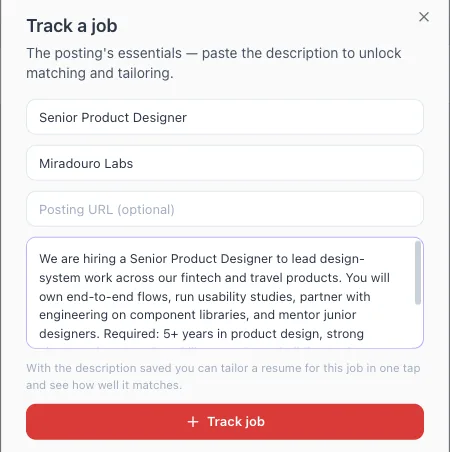
Add a job and paste the posting
Create a card with the company, role, and a link to the posting, then paste the job description onto it — or save it in one click from the posting with the Chrome extension. The link is stored on the job for one-click reopening — it's your record of where you applied, kept next to everything else about that application.
- Step 02
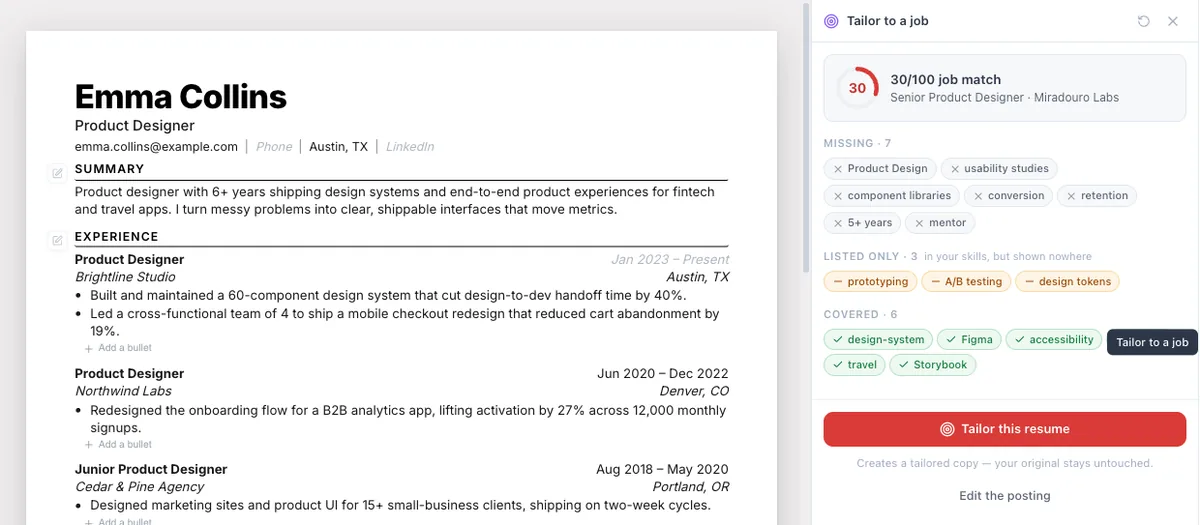
Tailor a resume and see the match
From the job, tailor a resume to its description and it links back to the card. A keyword match score, computed in code from real coverage, shows on the job as a chip — so you can see at a glance which applications are strong and which are thin before you send them.
- Step 03
Move it through your pipeline
Drag the card across saved, applied, interviewing, and offer. Dragging into Closed asks whether it was rejected, withdrawn, or accepted, so your history stays honest without a wall of status colors.

- Step 04
Follow up before it goes cold
A follow-up queue surfaces the jobs that need attention — a reminder date you set that's passed, a deadline that's imminent, an applied role gone quiet, or an interview with no movement. It nudges only when there's a real reason, never with a guilt-inducing all-clear.
Why it works
Every job carries its own resume
This is the difference from a plain board: each tracked job links the resume you tailored to its posting, so you're never guessing which version you sent where. Your applications and their artifacts live together, not in scattered files.
A match score you can trust per job
The keyword match on each card is computed in code from real coverage of the posting's terms — not a model's guess. It updates when you re-tailor, so a card's chip always reflects the resume actually linked to it.
The hub of a whole application loop
From a single job you can tailor its resume, run a gap-focused mock interview against its description, or draft a cover letter — the tracker connects the tools instead of being a dead-end list you copy out of.
A follow-up queue that earns the return visit
Applications go silent, and the queue is what turns a tracker into a habit: it flags overdue follow-ups, imminent deadlines, and stalled applications — derived on the fly from your board, with no reminders you didn't earn.
This tracker vs. a dedicated job tracker
| Comparison criteria | AI ResumeGuru | Dedicated trackers (Teal, Huntr) |
|---|---|---|
| Browser extension to clip jobs | Yes — one-click save from any board | Yes |
| Tailored resume per tracked job | Built in — each job links its own | Separate tool or manual |
| Deterministic match score per job | Computed in code, on the card | Varies / keyword lists |
| Interview prep from the job | Gap-focused mock interview, one tap | Not part of the board |
| Cover letter from the job | Draft from the same card | Separate tool or manual |
What is a job application tracker?
A job application tracker is a single place that records every role you've applied to and what stage it's reached — instead of that record living across your inbox, your browser tabs, and a folder of resume files. The useful ones go further than a status: they hold the artifacts of each application. Here, a tracked job carries the posting link, the resume tailored to that exact description, a keyword match score computed in code, your notes, and the next step — and the board itself derives a follow-up queue from the applications that have gone quiet. It's free to start: your first 8 jobs are on the free tier, with the resume tailored to each one and its match score included. The demo board above is the same layout, running on sample applications you can move around.
Do you actually need a job application tracker?
At low volume, honestly, a spreadsheet is fine — a handful of applications fit in a few columns. A tracker earns its place once your applications carry artifacts: a resume tailored to each posting, a match score, follow-up dates, a cover letter. That's the moment a flat list stops working, because the thing you need isn't a status — it's the tailored resume you sent and whether it's time to chase a reply. If you're tailoring per job, the board that holds those copies is worth more than the board that just holds statuses.
Job tracker vs. a spreadsheet — which is better?
A spreadsheet is free, flexible, and yours forever, and for a light search it's genuinely hard to beat. Where it falls down is the loop: a cell can hold a status, but not the tailored resume, the computed match score, or the cover letter for that job — and it won't tell you which applications have gone quiet. This tracker keeps each job's artifacts on its card and derives a follow-up queue from your board, so the work that actually moves an application forward lives in one place instead of across a sheet and a folder of resume files.
How does the tracker connect to tailoring and interviews?
Each card is a launch point, not a dead end. From a job you can tailor a resume to its description and have it link back with a match score, run a mock interview that probes the requirements your resume barely evidences, or draft a cover letter — all grounded in that job's posting. Capture is covered too: the Chrome extension clips a posting onto the board in one click and shows your keyword match beside it, so the loop starts at the listing and runs all the way through.
A generous free tier lets you track your first 8 jobs with their tailored resumes and match scores; tracking unlimited jobs is a Pro feature, as is tailoring beyond your first free copy.
Frequently asked questions
How is this different from a dedicated job tracker?
Capture is matched: our Chrome extension clips a job from the posting in one click, like Teal's or Huntr's. The edge is the integrated loop — every tracked job carries its own tailored resume, a deterministic match score, gap-question interview prep, and a cover letter, so the board is the hub of your applications rather than a standalone list.
Does each tracked job get its own resume?
Yes — that's the point. When you tailor a resume to a job's posting, it links back to that card, so every application on your board carries the exact version you sent. You're never hunting through files to find which resume went with which job.
Is there a browser extension to save jobs?
Yes — the AI ResumeGuru Chrome extension saves a posting from LinkedIn, Indeed, Greenhouse, Lever, or any board you enable, in one click from the page. It carries the full description onto the card and shows your keyword match right in the side panel. You can still paste a posting manually whenever you prefer.
What stages does the board have?
Four columns you drag between — saved, applied, interviewing, and offer — plus a Closed lane below. Moving a card to Closed asks whether it was rejected, withdrawn, or accepted, so your history stays accurate without turning the board into a rainbow of statuses.
How does the match score on each job work?
When a resume is tailored to a job, a keyword match score is computed in code from real coverage of the posting's terms — not guessed by the AI — and shows as a chip on the card. It reflects the resume actually linked to that job and updates when you re-tailor.
Will it remind me to follow up?
Yes. A follow-up queue surfaces jobs that need attention — a reminder date you set that has passed, a deadline that's imminent, an applied role that's gone quiet, or an interview with no movement. It only nudges when there's a genuine reason, and stays out of your way when there's nothing to chase.
Can I prep for the interview from a tracked job?
Yes. From a job you can launch a mock interview that reads its description and aims questions at the requirements your resume barely evidences, then draft a cover letter for the same role — both grounded in that job's posting, without re-pasting anything.
Is the job tracker free?
You can track your first jobs, with their tailored resumes and match scores, on a generous free tier — the tracker needs a free account. Pro removes the cap for unlimited tracked jobs and unlimited tailored copies beyond your first free one.
Should I use this or a spreadsheet?
For a handful of applications, a spreadsheet is genuinely fine. This pays off once you're tailoring per job: a spreadsheet cell can hold a status, but not the tailored resume, the computed match score, the cover letter, or a follow-up queue that flags which applications have gone silent. If your applications carry artifacts, the board that holds them beats the one that only holds statuses.