Your resume is sitting in a recruiter’s inbox. Right now. Sandwiched between 247 other PDFs with names like Resume_Final_v3_UPDATED.pdf.
Think they’ll remember yours tomorrow? Next week? When they’re finally ready to make that call?
of recruiters research candidates online
Before reaching out, hiring managers Google you. What will they find?
Source: CareerBuilder Survey
Here’s what separates forgettable candidates from memorable ones: Presence.
A PDF gets downloaded, glanced at, and buried. A portfolio gets bookmarked, shared, and remembered.
TL;DR
- Your resume is a file. Your portfolio is a presence.
- One click projects your resume into a live portfolio—hero, experience, projects, skills, and more.
- A gallery of templates from clean to bold and dark, with editable sections and dark options.
- Edit a private draft, then publish a shareable page at
airesume.guru/u/yourname. - Generous free tier with an auto URL. Pro adds a custom URL, custom domains, and removes the badge.
The Problem With Static Resumes
Let’s be honest about what happens when you send a PDF:
- You email it
- It lands in a folder called “Applicants” (if you’re lucky) or “Downloads” (if you’re not)
- The recruiter opens it once—maybe twice
- It competes with dozens of identical-looking documents
- Your file name is the only thing distinguishing you from
John_Smith_Resume.pdf
The PDF Graveyard
- No analytics (did they even open it?)
- No way to update once sent
- No personality or branding
- Easily lost in crowded inboxes
- Completely passive—waiting to be found
Meanwhile, candidates with portfolios are:
- Showing up in Google searches
- Getting shared between hiring managers (“Check this one out”)
- Standing out with professional URLs on their LinkedIn
- Updating their experience without resending files
A portfolio fixes the visibility problem; to fix the follow-up problem, track your applications in one place.
What If Your Resume Had a URL?
Imagine this: Instead of attaching a PDF, you share a link.
airesume.guru/u/alexchenThe recruiter clicks. They see your professional photo, your experience laid out beautifully, your projects with context, your skills organized visually. They can navigate by section. View it on their phone. Share it with their team with one click.
No downloads. No version confusion. No “which file was the latest one?”
Just you—professionally presented and instantly accessible.
Average time reviewing a resume
A portfolio gives you more real estate to make an impression
Source: Ladders Eye-Tracking Study
How to Create Your Portfolio (No Code)
Here’s the exact process to turn your resume into a personal website:
Step 1: Build or import your resume
Use the AI ResumeGuru editor to create your resume. Add your experience, education, skills, and projects. Your resume is the foundation—the portfolio projects directly from it.
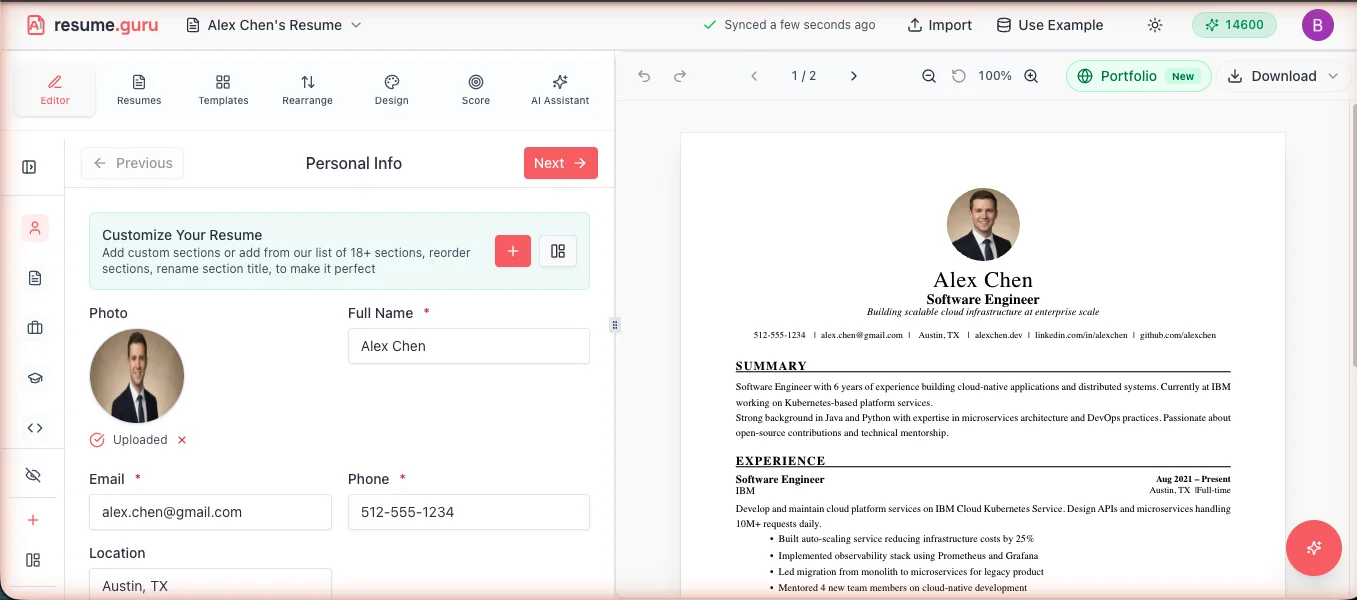
Step 2: Open the Portfolio tab
In the app, head to the Portfolio tab at airesume.guru/app/portfolio. One click projects your resume into a live portfolio—your hero (name, headline, bio, links, avatar), experience, projects, education, and skills are all mapped for you.
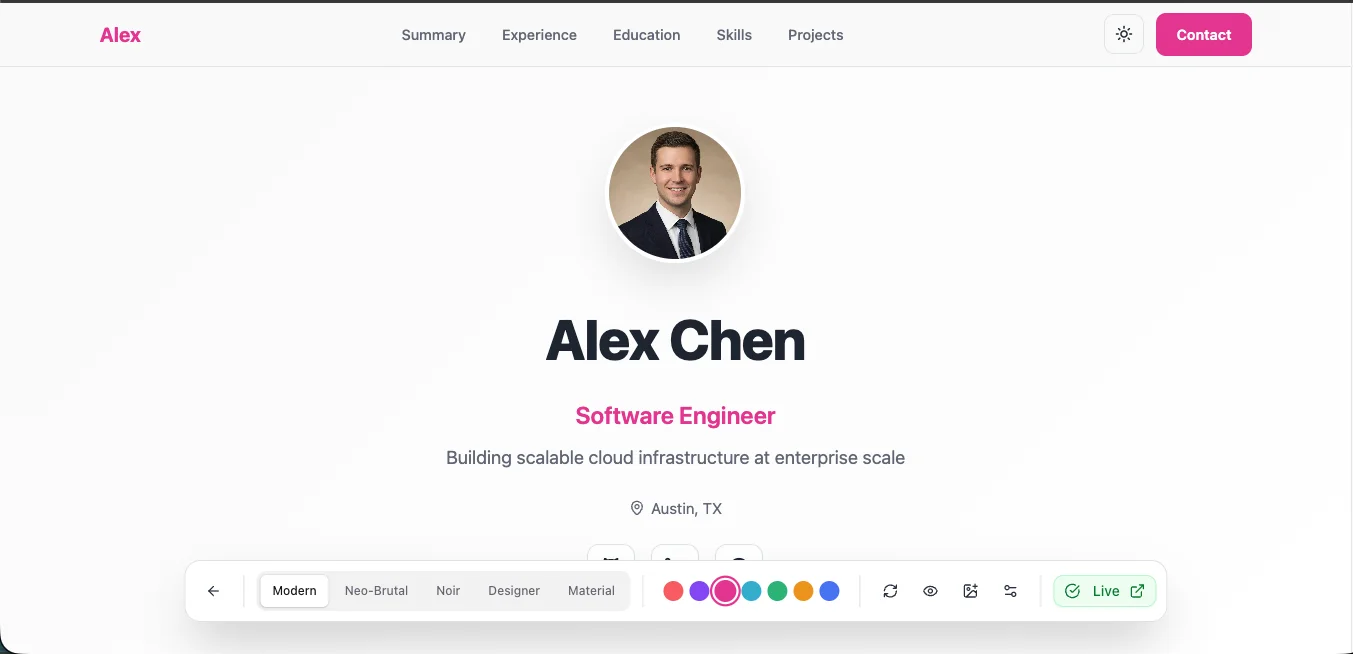
Step 3: Choose your template and make it yours
Pick a template from the gallery and edit any section right on the page. Add portfolio-only sections your PDF can’t carry—testimonials, custom sections, and media on individual entries. Changes land on your private draft, so nothing goes public until you say so.
Step 4: Publish your draft
When it looks right, publish. That freezes a snapshot to your public page and lets you set your URL, flip the search-indexing toggle, and (on Pro) connect a custom domain.
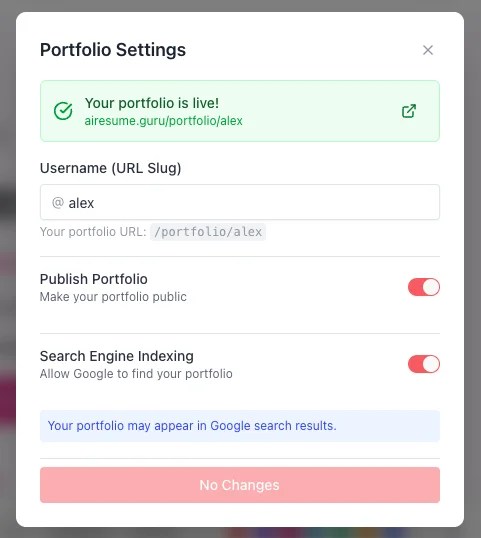
Step 5: Share your new presence
Your portfolio is now live at airesume.guru/u/yourname. Add the URL to your LinkedIn, email signature, business cards—anywhere you want to be found.
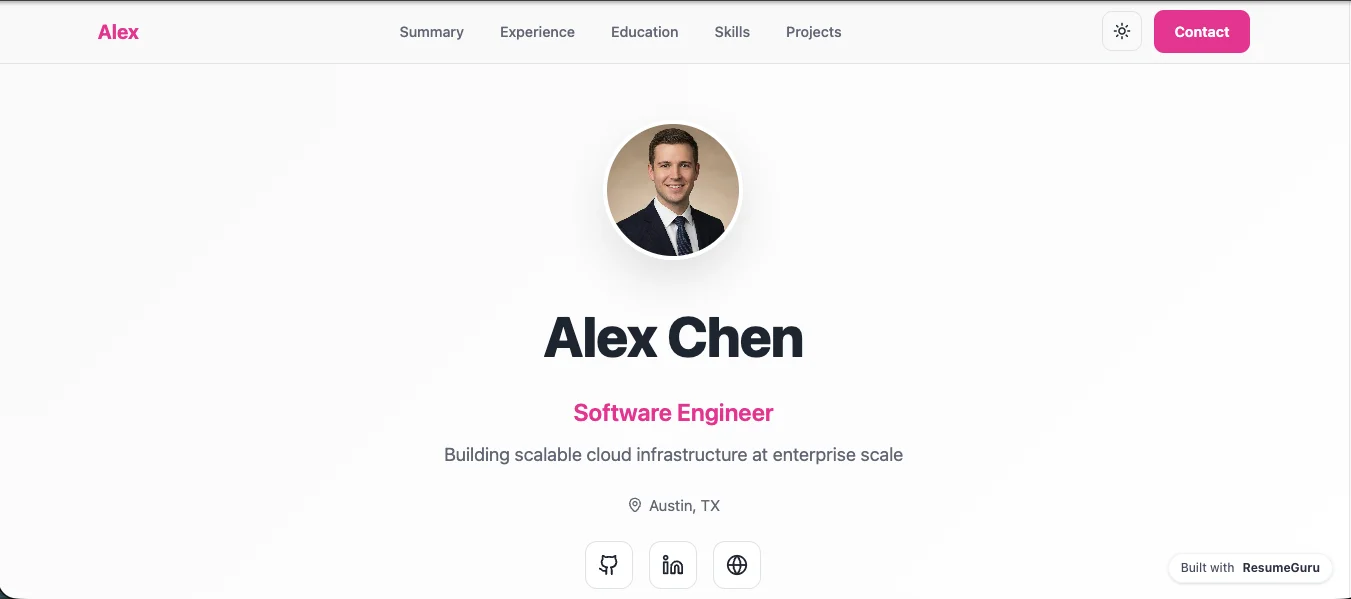
That’s it—static file to live presence, no code in sight.
Applying abroad? Conventions differ, and our European CV format and Europass guide covers what changes.
A Template for Every Brand
Not everyone’s brand looks the same. That’s why the gallery spans clean, professional styles through bold and creative ones—free and Pro tiers—so you can match the signal you want to send. A few of the looks you’ll find:
Editorial
Light, serif, generous whitespace—lets the work speak. A calm, credible default.
Best for: Writers, researchers, consultants, anyone who wants understated polish
Classic
A vCard sidebar with a connected timeline and career-span view—trust first.
Best for: Business professionals, managers, career switchers
Material
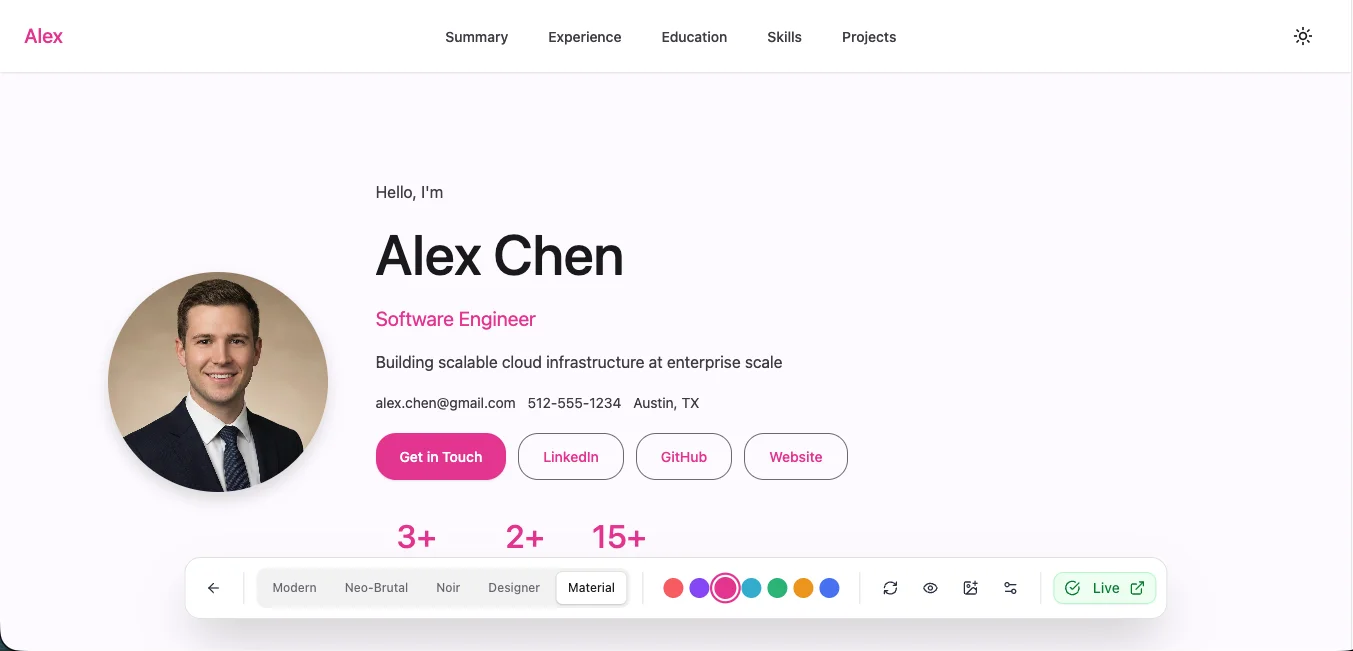
Elevated cards, chips, and gentle motion in the Material Design spirit.
Best for: Software engineers, product managers, data scientists
Noir
Premium dark with ghost numerals, a timeline rail, and bold stats.
Best for: Developers, security professionals, anyone who prefers dark themes
Terminal
Your career as a shell session—type help, hire accordingly.
Best for: Engineers and hackers who want their page to feel like their craft
Binge
Your career as a streaming service—a billboard hero and poster rows.
Best for: Creatives and storytellers who want maximum visual impact
Alongside these sit calmer options like Slate, Zen, Studio, and Enigma, plus playful takes like Greeter, Moodboard, Neo-Brutal, and Rewind. The exact roster grows over time, so browse the live gallery and pick what feels like you.
Can't Decide?
Switch templates any time—your content stays put and re-flows into the new look instantly. It all happens on your draft, so nothing goes public until you publish.
You’ll still need a document version for online applications, so browse ATS-safe templates for that side of the job hunt.
PDF vs. Live Portfolio
Let’s compare what you’re sending versus what you could be sharing:
| Static PDF ❌ | Live Portfolio ✅ |
|---|---|
| File gets buried in inbox | Link gets bookmarked |
| Static once sent | One click syncs your latest resume |
| Must resend for every update | Edit a draft, publish when ready |
| Looks like everyone else's | Branded with your chosen template |
| Can't be Googled | SEO-ready with an indexing toggle |
| Works only on desktop | Responsive on all devices |
| No social proof | Shareable URL builds credibility |
Features That Make You Stand Out
Your Own URL
Publish for free with an auto-generated URL, and on Pro choose a custom slug so airesume.guru/u/yourname becomes your professional identity—or connect your own custom domain.
One-Click Sync
Update your resume in the editor, then sync it into your portfolio in a click. Anything you customized is preserved—resume edits surface as conflicts you can accept or keep, never a silent overwrite.
Draft and Publish
Edit a private draft as much as you like. Publishing freezes a snapshot to your public page, so visitors only ever see the version you chose to ship.
Portfolio-Only Sections
Go beyond the paper version with sections a PDF can’t carry—testimonials, custom sections, and media attached to individual experience or project entries.
SEO Ready
Flip the indexing toggle to let Google find you, or leave it off for privacy. Every published page ships with an OG preview card and JSON-LD Person markup so it looks sharp when shared and reads cleanly to search engines.
Mobile-Responsive
Looks great on phones, tablets, and desktops. Because recruiters check LinkedIn on their commute.
What to Include on Your Portfolio
Because the portfolio is generated from your resume, the essentials are already there. But a few sections make a live page far stronger than the paper version it came from:
Portfolio Content Checklist
- A short about/bio that says who you are and what you do
- A professional headshot
- Work experience in reverse-chronological order
- Projects or work samples (the thing a PDF can't show well)
- Skills, organized visually
- Education and certifications
- Testimonials or references (optional, but strong)
- A clear way to reach you (a professional email or contact link)
You don’t have to build any of this from scratch. Edit it once in your resume and it flows straight to your live page.
Common Mistakes to Avoid
A live page is public in a way a PDF in someone’s inbox is not. Sidestep these:
Don't do these
- Publishing your home address or personal phone number. Keep private details off a public page; use a professional email instead.
- Treating the page like a screenshot of your PDF. A portfolio should show more than paper can, not less.
- Skipping the mobile check. Recruiters open links on their phones, so view it on yours before you share it.
- Leaving outdated info, placeholder text, or dead links live.
- Forgetting to add the link back to your resume once the page is published.
Free vs Pro: What You Get
Free
- Free-tier portfolio templates
- One-click resume sync
- Draft-and-publish workflow
- Auto-generated public URL
- SEO indexing toggle
- Portfolio-only sections
Pro
- Everything in Free, plus:
- Pro-only templates
- Custom URL slug
- Custom domains
- Removes the 'Powered by AI ResumeGuru' badge
- Priority support
The portfolio has a genuinely generous free tier—no trial timer, no credit card to publish. Pro unlocks the custom URL, custom domains, the Pro template designs, and drops the small badge.
The Psychology of Presence
Here’s why portfolios work on a deeper level:
Identity
A PDF is a file. A portfolio is you. It has your name in the URL. Your colors. Your chosen presentation. It signals that you take your career seriously enough to invest in how you’re perceived.
Scarcity
Your slug is unique. airesume.guru/u/alexchen can only belong to one person. First come, first served. This creates urgency—claim yours before someone else does.
Social Proof
When a recruiter sees a professional portfolio, they assume you’re the kind of person who:
- Cares about presentation
- Knows how to use modern tools
- Thinks ahead about their career
That assumption works in your favor before they even read your experience.
Reciprocity
You’ve made it easy for them. No downloads. No file management. One click and they’re looking at your work. People appreciate convenience—and remember who provided it.
Quick Setup: Your First Portfolio
Ready? Here’s your checklist:
Portfolio Launch Checklist
- Resume built in AI ResumeGuru editor
- Photo uploaded (optional but recommended)
- Portfolio tab opened and resume synced in
- Template chosen
- Sections reviewed and any extras added
- URL slug set
- SEO indexing preference set
- Draft published
- URL copied and ready to share
Where to Use Your New Portfolio Link
Once live, maximize your visibility:
| Platform | Where to Add |
|---|---|
| Website field in contact info + featured section | |
| Signature block | |
| Job Applications | Alongside traditional resume |
| Business Cards | QR code or shortened URL |
| Twitter/X | Bio link |
| GitHub | Profile README |
The LinkedIn Play
Add your portfolio URL to your LinkedIn’s “Website” field. When recruiters view your profile, they’re one click away from your full presentation. This is how you stand out in a sea of generic profiles.
Your Next Move
Every day without a portfolio is a day you’re harder to find, harder to share, and harder to remember.
Your resume is a file sitting in someone’s downloads folder. Your portfolio is a presence that works for you 24/7—getting bookmarked, getting shared, getting you noticed.
Claim your username. Choose your template. Go live.
Create Your Portfolio Today
No credit card. No coding. Just a professional presence that finally does you justice.
Build My PortfolioYour competition is sending PDFs. Be the candidate they remember.
Related Resources
- Create Your Portfolio — Project your resume into a live portfolio in a click
- LinkedIn Profile Optimization — Optimize your LinkedIn to complement your new portfolio
- How to Add Portfolio Links to Your Resume — Best practices for including portfolio URLs on resumes
- LinkedIn URL on Resume — Where and how to add your LinkedIn URL to your resume
- Resume Templates — Browse professional resume templates that pair with portfolios
Frequently Asked Questions
What's the difference between a resume and a portfolio?
A resume is a static document (PDF/Word) you send to employers. A portfolio is a living webpage that showcases your experience with a shareable URL, one-click updates from your resume, and a professional web presence.
Do I need coding skills to create a portfolio?
No. With AI ResumeGuru's portfolio builder, your resume projects straight into a live webpage. Just choose a template, edit your draft, and publish. No code required.
Is the portfolio free?
Yes. A generous free tier lets you build and publish a live portfolio with an auto-generated URL. Pro adds a custom URL, custom domains, and removes the small 'Powered by AI ResumeGuru' badge.
Can I customize how my portfolio looks?
Absolutely. Choose from a gallery of templates spanning free and Pro tiers—clean editorial styles through bold, dark, and creative looks—edit any section, add portfolio-only sections, and toggle what appears. Dark templates included.
Will my portfolio appear in Google search results?
You control this. Turn on the indexing toggle to let Google find your portfolio, or leave it off if you prefer privacy. Your published page also ships with an OG preview card and JSON-LD Person markup for clean sharing.
What happens when I update my resume?
One click syncs the latest resume content into your portfolio draft. Anything you customized on the portfolio is preserved—resume changes surface as conflicts you can accept or keep, never a silent overwrite. Publish when you're ready.
What if I already have a personal website?
Use both! Your personal site can have blog posts, projects, and personality. Your AI ResumeGuru portfolio is a professional, resume-focused view perfect for job applications. Link between them.
Will this replace my PDF resume?
Not necessarily. Some applications still require file uploads. But for networking, LinkedIn, email signatures, and anywhere you have a choice—the portfolio wins.
How does draft-and-publish work?
You edit a private draft as much as you like. When it looks right, you publish—which freezes a snapshot to your public page. Nobody sees changes until you hit publish, so you can experiment freely.
Put this into practice
You have the theory. These take a few minutes and work on the resume you already have.