A LinkedIn “bio” isn’t a single field. It’s your headline (the 220-character tagline under your name) plus your About section (your longer 2,600-character summary). Together they’re the most-read, most-searched text on your profile, and the one-line formula is simple: who you help + a measurable result + your specialty.
Quick clarification, since people search for it constantly: LinkedIn has no field literally called “bio.” When someone says “LinkedIn bio,” they mean those two things working together. The headline gets a recruiter to stop scrolling. The About section gets them to remember you.
This guide gives you the formula for both, the exact character limits, an AI prompt you can paste into ChatGPT, formatting tricks for line breaks and bullets, and copy-paste examples for every career stage.
The Short Version
- Your headline (220 characters) is the tagline under your name. Don’t waste it on “Job Title at Company.”
- Your About section (2,600 characters) is your story. Aim for 150 to 300 words.
- Only the first 2 to 3 lines show before “see more,” so front-load your hook.
- Write in the first person, and seed it with the keywords recruiters search.
- Let the green #OpenToWork badge signal availability; keep the headline value-focused.
Why Your LinkedIn Bio Matters
LinkedIn has more than 1 billion members (LinkedIn, 2025), and it’s where hiring happens.
of recruiters use LinkedIn to find candidates
The highest adoption rate of any sourcing platform, making your profile a primary discovery surface.
Source: Zippia LinkedIn Statistics, 2026
A complete, well-written profile isn’t decoration. It’s discoverability. If a recruiter can’t find you in search, or finds you but bounces off a vague headline, the rest of your experience never gets read. Your headline and About section are where most of that signal lives.
The same keyword logic decides a good ATS score on the resume side.
The “See More” Hook: Your First 2 Lines
Here’s the detail most people miss. On both desktop and mobile, only the first 2 to 3 lines of your About section show before LinkedIn cuts it off with “…see more.” That’s roughly the first 200 characters on mobile.
So those opening lines are everything. Lead with a bold statement, a mission, or a surprising result, not “I am a results-driven professional with a passion for…”
Weak opening (dies before 'see more')
“I am a results-driven professional with a passion for excellence and a proven track record of success across multiple domains.”
Strong opening (survives the cutoff)
“I help mid-market SaaS companies turn pipeline into predictable revenue. Over five years, I’ve closed $9M+ in new business.”
The About Section Formula
Use this five-part structure (or the Present, Past, Future variation):
- 1
Hook (first 2 lines)
A bold statement, mission, or standout result that survives the 'see more' cutoff.
- 2
Who you are / what you do
One or two lines on your role, focus, and what you're known for.
- 3
Proof
One or two quantified achievements. Numbers, scale, outcomes.
- 4
Keywords
Weave in the job titles, skills, and tools recruiters search for, naturally.
- 5
Call to action
What you're open to and how to reach you.
Keep paragraphs short, use line breaks for breathing room, and read it aloud. If it sounds like a press release, rewrite it.
Don't want to draft from scratch?
Our free LinkedIn Bio Generator turns a few prompts into a headline plus an About draft you can refine. It bakes the formula in, so you start from a real draft instead of a blank box.
How to Write Your LinkedIn Summary Using ChatGPT (or AI)
AI can break the blank-page paralysis, but the trick is feeding it the right inputs and then editing hard. Generic prompts (“write me a LinkedIn summary”) produce generic, buzzword-stuffed output that recruiters spot instantly. Give it your real material instead.
Here’s a prompt that works:
Copy-paste ChatGPT prompt
“Write a LinkedIn About section in the first person, under 250 words. My role: [title]. My focus: [what you do]. Two quantified wins: [achievement 1], [achievement 2]. Target job: [role]. Keywords to include naturally: [paste from job postings]. Open with a punchy first line that survives the ‘see more’ cutoff. Conversational, no buzzwords like ‘results-driven’ or ‘passionate professional.’”
Then do the part AI can’t: cut anything that sounds like a template, swap in your real voice, and make sure every claim is true. If you want a tool built for this exact job (so you skip the prompt engineering), the LinkedIn Bio Generator drafts both the headline and the About section from a short questionnaire. For the keyword half, our Skills Finder pulls the exact terms out of a job posting so you know what to feed the prompt. For more on getting strong, specific output from AI rather than mush, see our guide to ChatGPT resume prompts.
The same material powers your resume, and you can rewrite your resume with AI without leaving your saved draft.
Formatting the About Section: Line Breaks, Bullets, and Symbols
A wall of text gets skimmed and skipped. LinkedIn doesn’t support rich formatting (no bold or italics) inside the About box, so people use spacing and Unicode symbols to add structure.
- Line breaks: Write in the box directly (the editor keeps your returns), or paste from a plain-text draft. Short paragraphs of two or three lines read far better than one dense block.
- Unicode bullets and arrows: Symbols like
•,▸, and→create visual lists you can paste in. They’re handy for listing skills or a few wins. - Emojis: A sparing emoji or two can break up sections (a 📌 before a CTA, say). Overdoing it reads as junior, so use restraint.
The ATS caveat on symbols
Some recruiters copy your headline or About text straight into an applicant tracking system or a sourcing tool. Fancy Unicode bullets and symbols can get garbled or stripped there, turning ”▸ Project Manager” into junk characters. Keep your core job titles and skills as plain, searchable words, and treat symbols as light decoration, not as the carrier of your keywords.
Your resume has no such symbol workarounds, so browse ATS-safe templates that handle structure with real formatting.
First Person or Third Person?
Write in the first person. “I help SaaS teams grow revenue” feels like a real human you’d want to talk to. “John helps SaaS teams grow revenue” reads like a corporate bio and feels dated for an individual.
The only exception: senior executives or public figures who deliberately want a formal, third-person tone.
Keywords: LinkedIn Search Works Like an ATS
Recruiters use LinkedIn Recruiter to search by keywords: job titles, skills, industries. If those terms aren’t in your headline and About section, you won’t appear in their results, no matter how qualified you are.
How to find your keywords
Pull up 5 to 10 job descriptions for roles you’d want. Note the skills, tools, and titles that repeat. Those are the exact terms to work into your headline and About section. (Our Skills Finder can extract them from a posting for you.) For the broader strategy, see our resume keywords guide, which applies just as well to LinkedIn.
LinkedIn About Section Examples (by Career Stage)
These are LinkedIn summary examples for job seekers at six different stages. Copy the structure, swap in your details.
1. Career changer (teacher to UX designer)
“After seven years teaching middle-school science, I learned that great learning is just great design. Both come down to understanding how people think. Today I design digital products with that same empathy. I recently completed a UX certificate and redesigned an onboarding flow for a fintech app that cut drop-off by 22%. I’m now looking for a UX role on a research-led team. Reach me at [email].”
2. Student / new grad with no experience (finance)
“Final-year Finance student at [University], graduating May 2026. I’m fascinated by how data drives investment decisions. Last summer I interned at a regional bank, where I built an Excel model that flagged $1.4M in reconciliation discrepancies. I’m seeking a full-time financial analyst role in FP&A. Always happy to connect with people in the field.”
3. Sales (B2B SaaS)
“I help mid-market SaaS companies turn pipeline into predictable revenue. Over the last five years I’ve closed $9M+ in new business and consistently hit 120%+ of quota by leading with discovery, not pitches. I specialize in complex, multi-stakeholder martech deals. If you’re scaling a sales team, let’s talk.”
4. Software engineer
“Full-stack engineer focused on reliable, scalable web apps. I work mainly in React, Node.js, and TypeScript, and I care as much about clean architecture as shipping fast. Recently re-architected a payments service handling 2M+ daily transactions, cutting p95 latency by 40%. Open to senior backend roles, and always happy to talk distributed systems.”
5. Marketer (content / SEO)
“I grow organic traffic that converts, not just vanity rankings. As a content and SEO lead, I’ve taken two B2B blogs from under 10K to 250K+ monthly organic visits and tied that growth to pipeline. My toolkit: editorial strategy, technical SEO, and a slightly unhealthy love of keyword clusters. Looking to partner with teams that treat content as a growth channel.”
6. Between jobs / recently laid off (operations)
“Operations leader who scales the messy middle, the stage where what got a company to $10M breaks on the way to $50M. Over 15 years I’ve built ops orgs across two high-growth startups and one turnaround, owning P&L, systems, and people. I’m currently exploring my next operations leadership role and write about scaling teams along the way. Reach out if you’re navigating rapid growth.”
Notice the last example never says “unemployed” or “laid off.” It frames the gap as forward motion. For a deeper look at availability signals, see what ‘Open to Work’ really means on LinkedIn.
LinkedIn Headline Examples for Job Seekers
Your headline is 220 characters of prime real estate. Don’t waste it on “Job Title at Company.” These LinkedIn headline examples for job seekers all follow a formula.
| Persona | Headline |
|---|---|
| Software engineer | Full-Stack Engineer | React, Node.js & TypeScript | Building Scalable Web Apps |
| Sales | Helping B2B SaaS teams turn pipeline into predictable revenue | $9M+ closed | Mid-market AE |
| Career changer | Former Teacher to UX Designer | Research-Led Product Design | Turning Empathy into Usable Products |
| Student / new grad | Finance Student @ [University] '26 | Aspiring Financial Analyst | FP&A & Investment Research |
| Marketer | Content & SEO Lead | Grew B2B organic traffic 25x | I turn rankings into pipeline |
| Executive | Operations Leader | Scaling startups from $10M to $50M+ | P&L, Systems & Teams |
| Open to work | Project Manager (PMP) | $4M delivered on time & under budget | Open to new roles |
| Formula | I help [who] achieve [result] | [proof point] | [key skill] |
The formula: who you help + a measurable result + your specialty. For job seekers: target role | key skills | proof or differentiator. For more patterns you can reuse, see our roundup of resume headline examples, which translate directly to LinkedIn.
Should You Put “Open to Work” in Your Headline?
Here’s a contradiction worth resolving, because old advice says to jam “Open to new roles” into your headline. The current consensus is more nuanced: let the green badge carry availability, and keep your headline value-focused.
people use LinkedIn's public #OpenToWork badge
The green banner already signals availability to recruiters, so your headline doesn't have to spend its limited characters saying it.
Source: Fortune, 2024
LinkedIn’s #OpenToWork badge comes in two flavors: a private setting visible only to recruiters, and the public green banner on your photo. Either one tells recruiters you’re available without you sacrificing headline space. So the rule of thumb:
- Default: Turn on the badge (private if you’re employed and discreet, public if you’re openly searching), and keep your headline about value, not job status.
- Optional: If you want belt-and-suspenders visibility, you can append a short “Open to new roles” after your credentials, like the Project Manager example above. Just don’t lead with it or let it crowd out your specialty.
The deeper trade-offs (does the green banner look desperate, who can see it) are covered in our guide to what ‘Open to Work’ means on LinkedIn.
Common Mistakes to Avoid
LinkedIn Bio Mistakes
- Leaving the headline as the default “Job Title at Company”
- Opening the About section with buzzwords (“results-driven, passionate professional”)
- Writing in third person as a regular professional
- A wall of text with no line breaks
- Using fancy symbols where your real keywords should be (ATS and search can’t read them)
- No keywords, so recruiters never find you
- No call to action, so readers don’t know what you want
A quick note on the numbers in your bio: vague claims read as fluff, but specific, quantified wins build trust fast. If you’re not sure how to turn a responsibility into a measurable result, our guide on how to quantify achievements walks through it with before-and-after examples.
Make Your LinkedIn and Resume Match
One more thing recruiters do: they cross-check your LinkedIn against your resume. Mismatched job titles, dates, or stories are a red flag.
So once your LinkedIn bio is sharp, make sure your resume tells the same story. The same hook-proof-keywords logic that powers a strong About section also powers a strong resume summary; see our professional summary examples for the resume side. For your full profile beyond the bio, read our LinkedIn profile optimization guide. And before you list your profile on a resume, check the right way to add your LinkedIn URL.
Stop staring at a blank About box
Our free LinkedIn Bio Generator drafts a complete headline and About section from a few prompts. Then build a matching resume with the AI builder and keep both in sync from one account.
Try the LinkedIn Bio GeneratorRelated Resources
- LinkedIn Bio Generator — Draft a complete headline and About section free
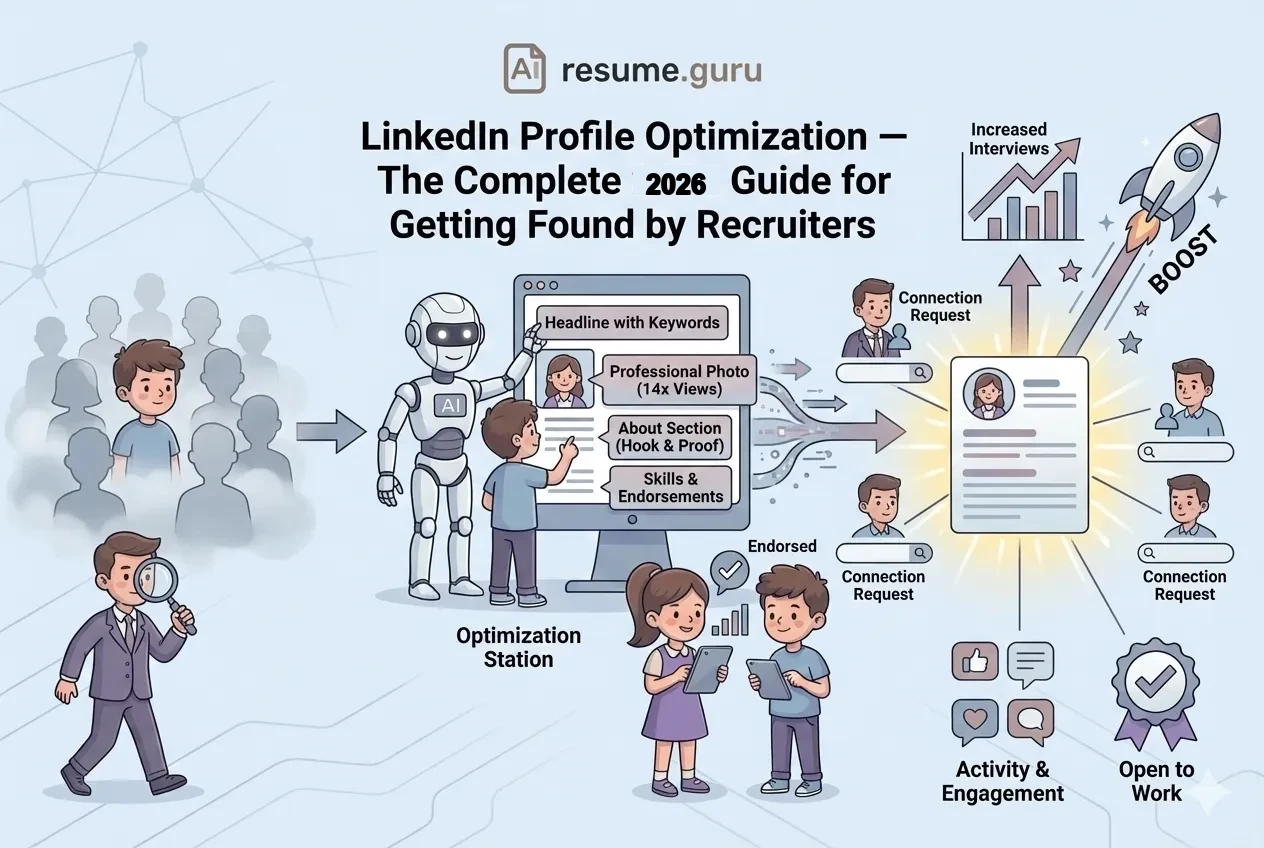
- LinkedIn Profile Optimization — Optimize your full LinkedIn profile
- AI Resume Builder — Build a resume that matches your LinkedIn
Frequently Asked Questions
What should I write in my LinkedIn bio (About section)?
Open with a hook in the first two lines, say who you are and what you do, prove it with a quantified achievement or two, weave in the keywords recruiters search for, and end with a call to action. Keep it conversational and in the first person, around 150 to 300 words.
How long should a LinkedIn summary be?
Around 150 to 300 words (three to five short paragraphs) is the engagement sweet spot, even though the About section allows up to 2,600 characters. The first two or three lines matter most, because they're all that shows before the 'see more' cutoff.
How many characters is the LinkedIn About section?
The About section allows up to 2,600 characters, and your headline is capped at 220 characters. Only the first roughly three lines (about 200 characters on mobile) appear before readers click 'see more,' so front-load your hook into those opening characters.
Should I write my LinkedIn summary in first or third person?
First person is the modern standard, because it feels authentic and conversational. 'I help SaaS teams grow revenue' reads like a real person. Third person now sounds like a corporate bio and is mostly reserved for senior executives or public figures who want extra formality.
How do I write a LinkedIn summary using ChatGPT?
Feed ChatGPT your role, two or three quantified wins, your target job, and the keywords from postings you want. Ask for a first-person About section under 250 words with a strong first line. Then edit heavily, because raw AI output sounds generic and recruiters can tell.
Should you put 'open to work' in your LinkedIn headline?
Usually no. Let the green #OpenToWork badge signal availability and keep your headline focused on value. If you want extra visibility, you can append a short 'Open to new roles' after your credentials, but don't lead with it or replace your specialty with it.
What to put on your LinkedIn headline when unemployed?
Use your professional identity, not your job status. Write your target role plus your key skills and one proof point, for example 'Project Manager (PMP) | $4M delivered on time | Open to new roles.' The green badge can handle the 'available' signal so your headline stays value-first.
How do I make my LinkedIn profile show up in recruiter searches?
Recruiters search LinkedIn by keywords much like an ATS does. Put your target job titles, skills, and tools in your headline and About section. Pull the recurring terms from five to ten job descriptions you'd want, then use them naturally throughout your profile.
What's the difference between the LinkedIn headline and the About section?
The headline is the one-line tagline under your name (220 characters) that shows in search results and connection requests. The About section is your longer summary (2,600 characters) where you tell your story. The headline gets you noticed; the About section gets you remembered.
What should a student or new grad put in their LinkedIn bio?
Lead with your field of study and graduation year, show genuine interest in your industry, highlight one concrete achievement (an internship result, a project, a relevant role), and state what you're looking for. You don't need years of experience; clarity and enthusiasm carry a new-grad profile.
Put this into practice
You have the theory. These take a few minutes and work on the resume you already have.