Your resume is a visual argument.
And like any argument, the order you present information matters. Lead with your weakest point, and they check out before reaching your strongest.
Resume scan time
Recruiters decide interest in the first third of page one
Source: Eye-tracking studies
The recruiter’s eye starts at the top left and moves down. Whatever section sits at the top of your resume gets the most attention. Whatever’s at the bottom may not get read at all.
This means section order isn’t just organizational—it’s strategic.
The Core Principle
- Top third of page one = your most important selling points
- Experience first for most professionals (shows what you’ve done)
- Education first for recent graduates (your main qualification)
- Skills up top for technical roles (what recruiters search for)
The Standard Resume Section Order
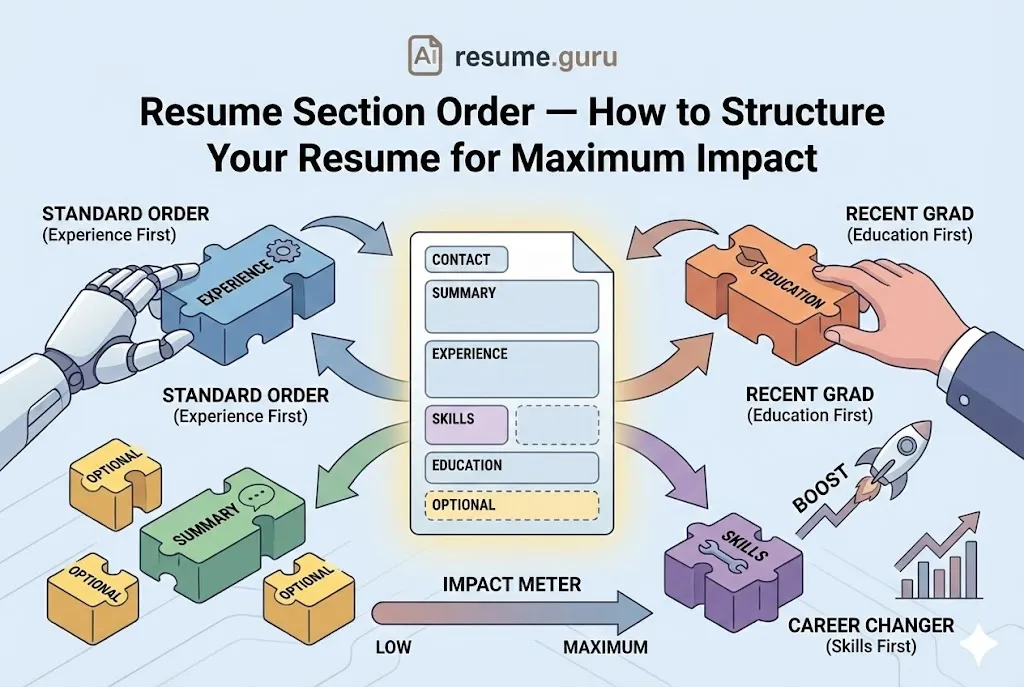
For most professionals with work experience, this is the optimal order:
Step 4 is where most resumes go vague — find the right skills to list for your target role before you fill it in.
- 1
1. Contact Information
Name, email, phone, LinkedIn, location (city only). Always at the very top.
- 2
2. Professional Summary or Objective
2-4 sentences summarizing your value proposition. Your elevator pitch.
- 3
3. Work Experience
Reverse-chronological job history with achievements. Usually the largest section.
- 4
4. Skills
Technical and relevant soft skills. Bulleted list for easy scanning.
- 5
5. Education
Degrees, certifications, relevant coursework. Brief after you have experience.
- 6
6. Optional Sections
Projects, certifications, volunteer work, awards, languages—if relevant.
This order works because it prioritizes what you’ve done (experience) over where you learned it (education), which is what most employers care about most.
When to Reorder: Section Strategies by Scenario
The “standard” order works for most people—but not everyone. Here’s when to rearrange:
Reordering is far easier on a layout built for it — browse ATS-safe templates with movable sections.
Scenario 1: Recent Graduate (Limited Experience)
If you’re fresh out of school with little to no relevant work history, your education is your main qualification.
Recommended Order:
- Contact Information
- Resume Objective (not summary—you don’t have achievements to summarize)
- Education ← Moved up
- Skills
- Projects / Internships / Relevant Coursework
- Work Experience (if any, even unrelated jobs)
New Grad Tip
Include GPA if it’s 3.5+ and you graduated recently. List relevant coursework and academic projects to show practical knowledge. As soon as you have 1-2 years of work experience, flip to the standard order.
Scenario 2: Career Changer
When your work history doesn’t match your target role, you need to lead with transferable skills—not jobs that look unrelated.
Recommended Order:
- Contact Information
- Professional Summary ← Frames your transition
- Skills ← Moved up to show relevant capabilities
- Work Experience ← Reframe bullets around transferable achievements
- Education (especially if you’ve added new credentials)
- Optional: “Relevant Projects” section
Career Change Tip
Your summary should explicitly address the transition: “Former educator with 5 years of curriculum design experience, transitioning to corporate training roles.”
Scenario 3: Technical or IT Roles
For software engineers, data scientists, and other technical positions, specific skills are often the primary filter. Recruiters search for “Python” or “Kubernetes,” not job titles.
Recommended Order:
- Contact Information
- Professional Summary
- Skills / Tech Stack ← Moved up for visibility
- Work Experience
- Projects (can be its own section if you have notable GitHub work)
- Education / Certifications
Tech Resume Tip
For software roles, consider a “Technical Skills” section with categorized skills (Languages, Frameworks, Tools, Databases). Put it where ATS and recruiters will see it immediately.
Scenario 4: Senior / Executive Level
At senior levels, a summary of leadership impact matters more than a sequential job list. Some executives use a “Core Competencies” or “Career Highlights” section before diving into experience.
Recommended Order:
- Contact Information
- Executive Summary (3-5 sentences on scope of leadership)
- Core Competencies / Key Achievements ← Optional up-front highlight
- Work Experience (emphasize scope, leadership, and business outcomes)
- Board Memberships / Speaking / Publications (if applicable)
- Education
Scenario 5: Academia / Research
Academic CVs follow different conventions—education and publications take precedence over industry experience.
Recommended Order:
- Contact Information
- Research Interests / Summary
- Education ← First, including dissertation
- Publications / Papers
- Research Experience
- Teaching Experience
- Grants / Awards
- Professional Service
Section-by-Section Guidance
Contact Information
Each section below has its own failure mode. For the experience section in particular, write stronger resume bullets before worrying about placement.
What to include:
- Full name (larger font, bold)
- Email (professional—not [email protected])
- Phone number
- LinkedIn profile URL (customized if possible)
- City, State (no full address needed)
Don’t include: Photo, full address, marital status, date of birth (in the US).
Summary vs Objective
| Use a Summary If… | Use an Objective If… |
|---|---|
| You have 2+ years of relevant experience | You’re entry-level with limited experience |
| You can quantify achievements | You’re changing careers |
| Your experience matches the target role | You need to explain your direction |
Both should be 2-4 sentences. See our Professional Summary Examples or Resume Objective Examples for templates.
Work Experience
Standard format:
Job Title | Company Name | City, State | Start Date – End Date
• Achievement bullet (action verb + result + context)
• Achievement bullet
• Achievement bullet
Rules:
- Reverse-chronological (most recent first)
- 3-5 bullets per job (more for recent roles, fewer for older ones)
- Focus on achievements, not duties
- Quantify wherever possible
Skills Section
Format options:
- Simple bulleted list:
Python • SQL • Tableau • Google Analytics - Categorized list (for technical roles):
- Languages: Python, JavaScript, SQL
- Frameworks: React, Node.js
- Tools: Git, Docker, AWS
What to include:
- Technical skills relevant to the job
- Soft skills (only 2-3, and only if genuinely differentiating)
- Tools and platforms you’ve used
Education
Standard format:
Degree Name, Major | University Name | Graduation Year
Optional: GPA (if 3.5+), Relevant Coursework, Honors
When to expand:
- Recent graduate: Include GPA, honors, relevant courses
- Experienced professional: Just degree, school, year—maybe just one line
Optional Sections
Include these only if they strengthen your candidacy:
| Section | When to Include |
|---|---|
| Certifications | If industry-recognized and relevant (PMP, AWS, CPA) |
| Projects | For developers, designers, or if you lack work experience |
| Volunteer Work | If it’s recent and demonstrates relevant skills |
| Languages | If the role involves international work |
| Awards | If notable and relevant (not high school accolades) |
| Publications | For academic, research, or writing-focused roles |
The “Top Third” Rule
Eye-tracking studies show recruiters spend the most time in the top third of page one.
That top third includes your first date range, so format dates on your resume consistently from the start.
What This Means
Whatever appears in the top 4-5 inches of your resume gets the most attention. Make it count.
- Your summary should be compelling
- Your most recent/relevant role should be visible
- Key skills should appear early
If your most impressive qualification is buried at the bottom of page two, it may never be read.
ATS and Section Order
Good news: ATS software reads your entire resume, regardless of section order. It doesn’t care if skills come before or after experience.
But humans do. And once your resume passes ATS, it’s humans who decide whether to interview you.
Design your order for the human scan—not the machine.
Common Section Order Mistakes
Mistake #1: Leading with Education (When You Have Experience)
If you’ve been working for 5 years, your degree is no longer your main selling point. Put experience first.
Mistake #2: Burying Skills at the Bottom
For technical and specialized roles, skills might be what gets you found. Don’t hide them on page two.
Mistake #3: Giant Objective Instead of Summary
A 5-sentence objective that takes up half the first page? That’s resume real estate wasted on what you want instead of what you offer.
Mistake #4: Random Section Order
“Awards” → “Experience” → “Objective” → “Skills” → “Education” = confusing. Stick to conventions unless you have a strategic reason.
Quick Reference: Optimal Order by Situation
| Situation | Recommended Top Section |
|---|---|
| Experienced professional (2+ years) | Summary → Experience |
| Recent graduate | Objective → Education |
| Career changer | Summary → Skills |
| Technical role | Summary → Skills |
| Returning to workforce | Summary → Skills |
| Senior/executive | Executive Summary → Achievements |
The Bottom Line
Resume section order is a strategic choice, not just organizational preference.
Lead with your strongest selling point. For most professionals, that’s experience. For new grads, that’s education. For career changers, that’s skills and a reframing summary.
The top third of page one is prime real estate. Put your best material there—and make sure recruiters don’t have to hunt for it.
Build with the right structure
AI ResumeGuru's templates are already organized for optimal impact—just fill in your content.
Start Building FreeRelated Resources
- Single vs Double Column Resume — Layout choices
- Professional Summary Examples — What goes in the top section
- Resume Objective Examples — For entry-level candidates
- Entry-Level Resume Guide — New grad strategies
- Resume Templates — Pre-structured designs
- Resume Builder — Drag-and-drop section reordering
Frequently Asked Questions
What order should resume sections go in?
For most professionals: Contact Info → Summary → Experience → Skills → Education → Optional sections. For recent graduates, move Education before Experience. For career changers, lead with a Skills or Summary section that bridges your background to the new field.
Should education or experience come first on a resume?
Experience first—unless you're a recent graduate or the role specifically requires a degree (like nursing, law, or academia). Once you have 1-2 years of relevant experience, education moves to the bottom.
Where does the skills section go on a resume?
For technical roles, put Skills near the top (after Summary) because specific skills are what recruiters filter for. For general roles, Skills can go after Experience.
Should I include an objective or summary at the top?
If you have experience: use a professional summary highlighting achievements. If you're entry-level or changing careers: use a resume objective stating your goals and transferable skills. Either way, this section should come immediately after contact information.
Does section order affect ATS scanning?
Not directly—ATS reads all text regardless of position. But human recruiters scan from top to bottom, making the first third of your resume critical. Put your strongest selling points where they'll be seen first.
Put this into practice
You have the theory. These take a few minutes and work on the resume you already have.