You're scrolling LinkedIn. Someone posts a job opening. The comments? Dozens of people writing "#CFBR" like it's some kind of secret code.
What does it mean? Why is everyone doing it? And should you be doing it too?
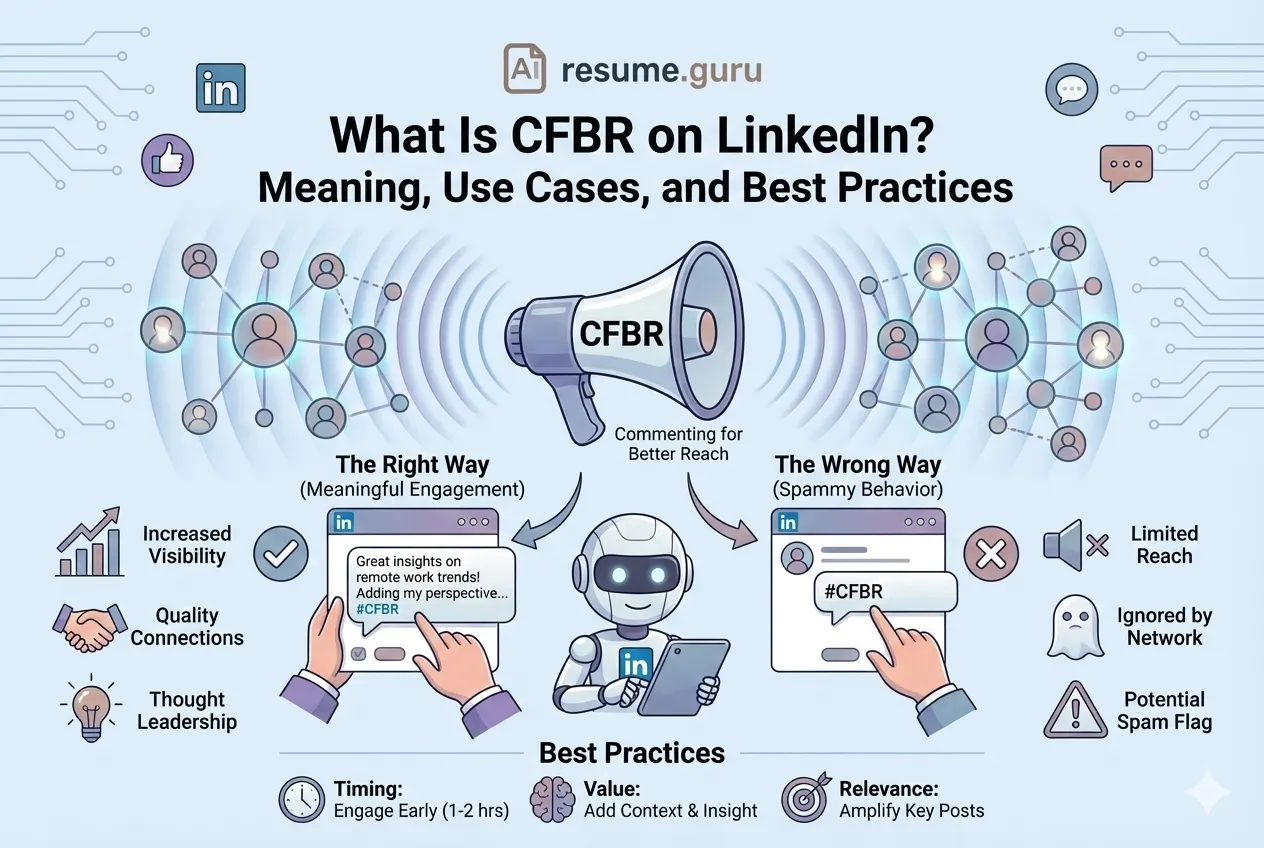
CFBR stands for Commenting for Better Reach. It's LinkedIn's version of "signal boosting"—a community shorthand that tells the algorithm and your network: "This post deserves to be seen."
Used right, CFBR can help hiring posts reach thousands. Used wrong, it makes you look like a spam bot.
Here's everything you need to know.
Key Takeaway
- CFBR = Commenting for Better Reach (not an official LinkedIn feature)
- Comments trigger algorithmic expansion to 2nd/3rd-degree networks
- Best for: hiring posts, industry news, community spotlights
- The secret: Add context, don't just type "#CFBR"
- Timing matters: engage within the first 1-2 hours
Why CFBR Actually Works (The Algorithm Explained)
LinkedIn doesn't show your posts to everyone who follows you. It tests them first.
Here's the simplified version of how LinkedIn distribution works:
- 1
You publish a post
Your content enters LinkedIn's distribution queue.
- 2
LinkedIn tests with ~10% of connections
Your post is shown to a small slice of your 1st-degree network.
- 3
Early engagement triggers expansion
If people comment, like, or share, LinkedIn shows it to more connections.
- 4
Momentum reaches 2nd and 3rd-degree networks
Strong engagement can push your post to people who don't follow you at all.
The Key Insight
Comments are the highest-value engagement signal. A thoughtful comment tells LinkedIn: "This content is worth discussing." That's why CFBR works—it generates meaningful early comments that trigger algorithmic expansion.
Tip
A 2-3 sentence comment with "#CFBR" at the end massively outperforms just typing "#CFBR" alone. The algorithm values substance, not shortcuts.
When to Use CFBR
CFBR works best when the post genuinely deserves amplification:
| High-Value Use Cases ✅ | Why It Works |
|---|---|
| Hiring and referral posts | Connects candidates with opportunities |
| Industry announcements | Spreads relevant news to your network |
| Community spotlights | Amplifies achievements and resources |
| Thought leadership | Shares insights your network would value |
| Nonprofit/DEI initiatives | Supports causes with broader visibility |
The Core Principle
Ask yourself: Would my network genuinely benefit from seeing this? If yes, CFBR away. If it's just self-promotion with no substance? Skip it.
When NOT to Use CFBR
Using CFBR on the wrong content damages your credibility and can trigger spam detection:
| Avoid CFBR For ❌ | Why It Backfires |
|---|---|
| Low-value self-promotion | Looks desperate; networks see through it |
| Content irrelevant to your audience | Misaligned amplification hurts your positioning |
| Sensitive or internal updates | Amplifying private matters is unprofessional |
| Mass-commenting on unrelated posts | Triggers LinkedIn's spam detection |
Warning
Copy-pasting the same "#CFBR" comment across multiple posts in a short time frame is a spam pattern. LinkedIn's algorithm notices—and so does everyone who visits your profile.
How to Use CFBR Correctly (Step by Step)
The difference between effective CFBR and spam is simple: add value.
- 1
Write a useful comment first
Your comment should stand on its own—even without the hashtag. Add 1-3 sentences with a takeaway, your perspective, or why your network should care.
- 2
Add the hashtag at the end
Once you've written something substantive, add #CFBR. This signals to others that you're intentionally boosting visibility.
- 3
Time it right
The first 60-120 minutes after a post goes live is the critical window. Early comments have outsized impact on algorithmic distribution.
Comment Templates That Actually Work
Not sure what to write? Here are templates you can adapt:
For Hiring Posts
"We're looking for a Senior Frontend Developer in Toronto—happy to chat with anyone interested or refer strong profiles. Remote-friendly. #CFBR"
For Industry Insights
"Clear breakdown of 2026 hiring trends—especially the section on remote work expectations. Sharing with my team. #CFBR"
For Resources/Tools
"Bookmarking this for later. The ATS optimization tips alone are worth the read. #CFBR"
For Announcements
"Congrats on the launch! The new dashboard looks significantly more intuitive. #CFBR"
Best Practices That Keep You Out of Spam Territory
The CFBR Checklist
- Only amplify content genuinely relevant to your audience
- Add perspective—one insight, question, or reaction minimum
- Stagger team engagement (avoid 20 identical comments in 5 minutes)
- Tag responsibly—1-3 relevant people max
- Vary your phrasing across different posts
- Engage early—first 1-2 hours have the most impact
Common Mistakes and How to Fix Them
Mistake 1: Only Typing '#CFBR'
Why it hurts: Weak engagement signal; LinkedIn sees no real comment The fix: Add 1-3 sentences of context before the hashtag
Mistake 2: Spamming Multiple Posts at Once
Why it hurts: Triggers spam heuristics; damages your credibility The fix: Limit to 2-3 high-relevance posts per day
Mistake 3: Off-Topic Amplification
Why it hurts: Confuses your network about your brand and expertise The fix: Stick to your niche and industry
Mistake 4: Commenting Days Later
Why it hurts: Misses the critical early-engagement window The fix: Engage within the first 1-2 hours for maximum impact
Mistake 5: Tagging Random People
Why it hurts: Comes across as desperate and spammy The fix: Only tag people who would genuinely care about the content
Team Playbook: Coordinating CFBR for Hiring Posts
If your company is hiring and you want to maximize reach, here's how to coordinate CFBR across your team without looking spammy:
- 1
Share the post link internally
Include 1-2 bullet points suggesting angles to comment on.
- 2
Encourage unique comments
Each person adds their own perspective—no copy-pasting.
- 3
Stagger timing
10-20 people comment over 2-4 hours, not all at once.
- 4
Selective reposts
2-3 team leaders repost with unique takeaways.
- 5
Track and iterate
Monitor reach, saves, and profile visits. Refine your approach.
Note
The goal is organic-looking momentum, not a coordinated spam attack. Quality over quantity—always.
Ethical Considerations
CFBR is a community tool, not a hack. Use it responsibly:
Do This
- Treat it as genuine community support
- Only amplify content you'd stand behind
- Follow your company's social media guidelines
- Add real value with every comment
Don't Do This
- Artificially inflate low-quality content
- Amplify confidential or sensitive information
- Participate in engagement pods requiring reciprocal fake engagement
- Use it for every single post you see
CFBR and Your Personal Brand
Every comment you leave on LinkedIn is visible on your profile. CFBR comments are no exception.
Before commenting, ask yourself: "Would I be comfortable if a recruiter or hiring manager saw this comment?"
Tip
If the post is genuinely valuable and your comment adds perspective, CFBR actually helps your personal brand. It shows you're engaged, thoughtful, and connected to your industry.
The Bottom Line
CFBR works. But only when you use it thoughtfully.
The difference between effective amplification and spam is simple: substance. A thoughtful comment with "#CFBR" tells the algorithm and your network that this content matters. A bare "#CFBR" tells everyone you're gaming the system.
Remember
- Add context—don't just type the hashtag
- Be selective—only boost content that deserves it
- Engage early—first 1-2 hours matter most
- Protect your brand—every comment is public
Related Resources
Looking to improve your overall LinkedIn presence?
Optimize Your LinkedIn Profile
Your LinkedIn profile should match your resume. Use our free tools to create a compelling headline, summary, and profile that gets you noticed.
Try LinkedIn Bio GeneratorMore tools for your job search:
- Resume Builder — Create an ATS-optimized resume that matches your LinkedIn profile
- Job Matcher — See how your profile aligns with specific roles
- Keyword Scanner — Check if your resume has the right keywords
Frequently Asked Questions
What does CFBR mean on LinkedIn?
CFBR stands for Commenting for Better Reach—a community signal used in comments or repost captions to help a post gain wider distribution through meaningful early engagement.
Is CFBR an official LinkedIn feature?
No. It's not a platform feature; it's a community convention. The quality and timing of your comment are what matter.
Should I put CFBR in the post or the comment?
Prefer comments. If you use it in a repost caption, add a unique takeaway or context to avoid looking like a spam bot.
Can CFBR cause shadowbans?
Used responsibly—no. Spammy behavior like copy-pasting, irrelevant tagging, or mass-commenting can reduce distribution and damage your credibility.
How often should I use CFBR?
Occasionally, for high-relevance posts (hiring announcements, valuable resources, major news). Overuse dilutes trust and may trigger spam detection.
Does the exact hashtag format matter?
Most people use #CFBR. The comment content and timeliness matter far more than the exact casing or format.
Build Your Perfect Resume
Create an ATS-optimized resume with our AI-powered builder.
No signup required.Start Building FreeExplore Resources
Enjoyed this article?
Share it with your network